Introduction to Operating Systems
Agenda
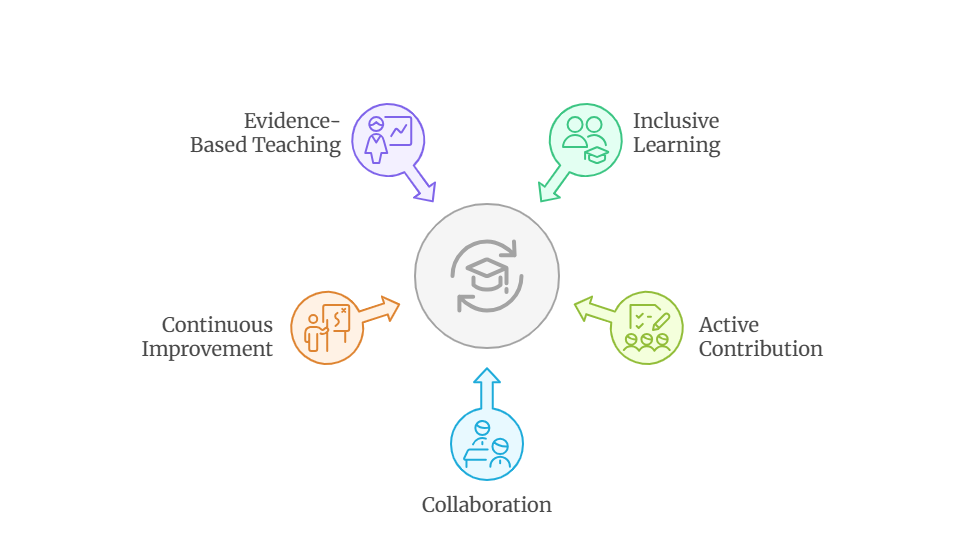
- Teaching Philosphy
- What an operating system?
- OS building blocks and core abstractions
- Virtualization of CPU and memory
- Concurrency and coordination challenges
- Persistence, file systems, and storage
- Security
- Further Reading
Together, We Succeed
OS role analogy

- Think of yourselves as customers. Everyone wants their order taken promptly, delivered to the correct table on time, prepared as requested, and billed accurately. What if the waiter panics?
- The operating system plays the role of the waiter, serving many clients concurrently
- It understands the menu (hardware capabilities), records requests, coordinates with the kitchen (devices), delivers food to the correct table, and tracks billing
Operating Systems
- Every OS answers the same uncomfortable questions: Who runs next? Who waits? Who gets memory? Who is stopped when something goes wrong?
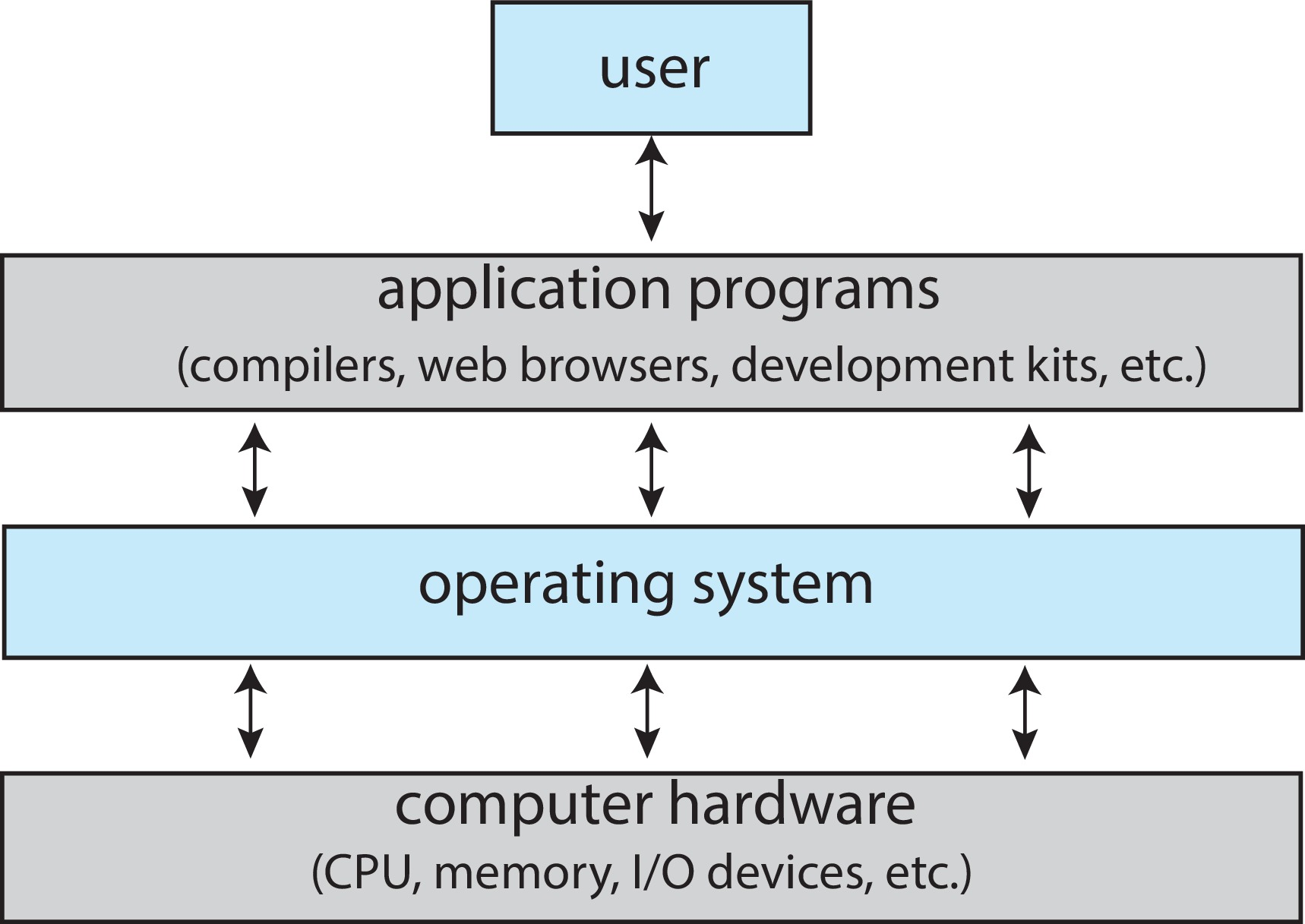
The operating system acts as middleware between applications and hardware.
- It executes user programs and makes solving problems easier
- It orchestrates concurrently executing processes
- It manages scarce resources such as CPU, memory, and devices
- It enforces access control and protection
- It provides abstractions that hide hardware complexity from software
 |
 |
 |
 |
 |
 |
Operating Systems
Multiprogramming - More than one program is loaded in memory and can be active at the same time
Multitasking (Time-sharing) - The CPU switches rapidly among processes so users can interact with multiple jobs concurrently
Multi-user - The operating system supports multiple users simultaneously using isolation and protection mechanisms
Enabled by:
- Context Switching and preemption
- Process Management
- CPU scheduling
- Virtual memory and protection
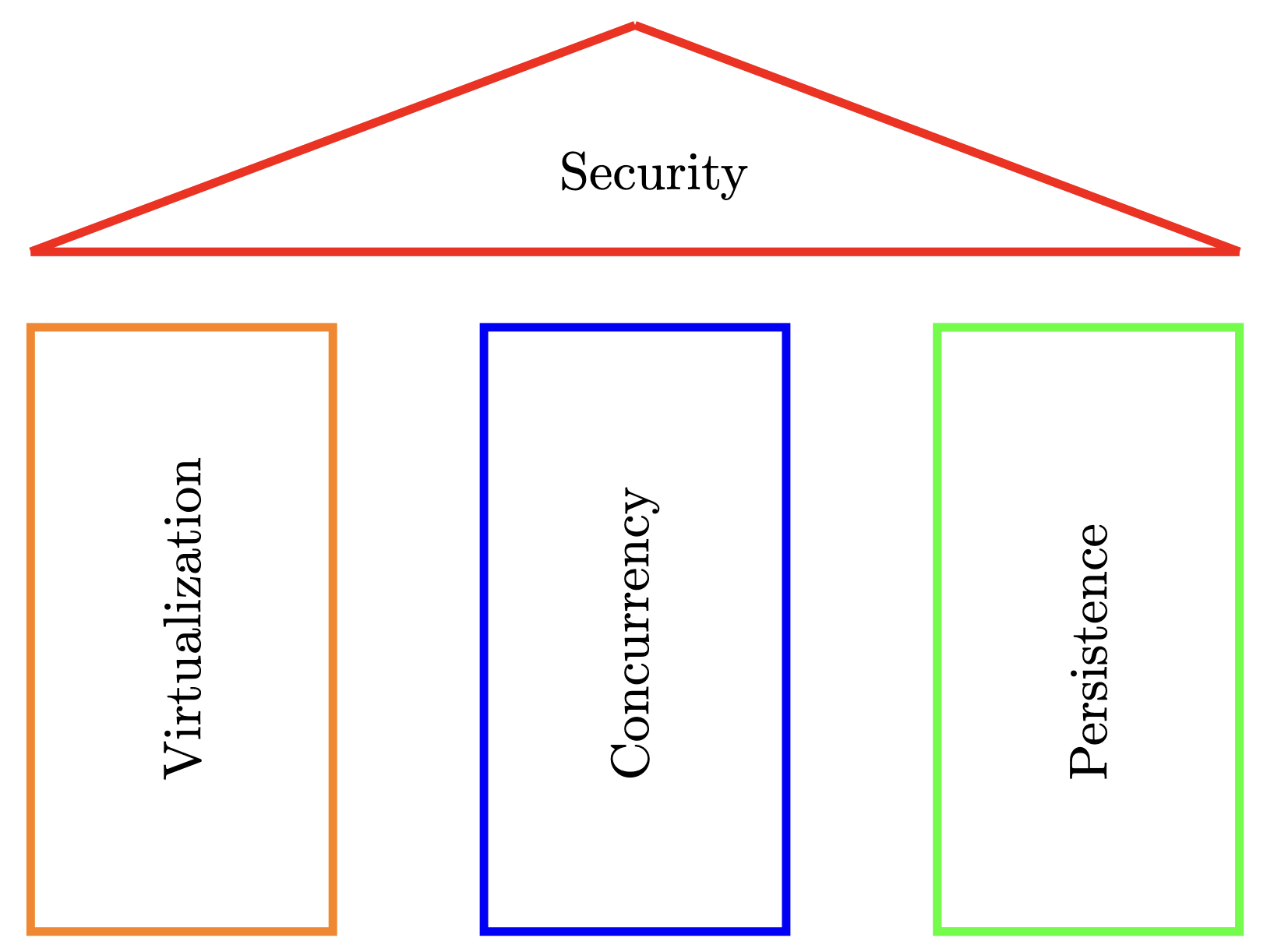
OS building blocks
OS design nicely separates into three pillars, with security as a transcendental layer covering/overarching all pillars.
Virtualizing the CPU
- The OS is a resource manager and creates a
virtual layerthat represents thephysical resourcethat allows multiple applications or processes to share the resource without interfering with each other. - Each process believes it has all resources for itself
- CPU: unlimited amount of instructions, continuous execution. The system has a very large number of virtual CPUs.
- Memory: unlimited memory (and disk) is available
- Challenge: how to share constrained resources (Week 2 - 4)
Code Example
Code Example
Can we run multiple cpu.c programs at the same time, and what happens when we do?
- Only one cpu.c will run; the others will not run until it finishes
- All programs run at full speed because the OS creates extra CPUs
- All programs run, but each appears to have its own CPU due to OS virtualizes and shares the processor
Code Example
Can we run multiple cpu.c programs at the same time, and what happens when I do?
❌ Only one cpu.c will run; the others will not run until it finishes
❌ All programs run at full speed because the OS creates extra CPUs
✅ All programs will run, but each appears to have its own CPU because the OS virtualizes and shares the processor
Computer-System Operation
- Common Functions of Interrupts
- Interrupt transfers control to the interrupt service routine generally, through the interrupt vector, which contains the addresses of all the service routines
- Interrupt architecture must save the address of the interrupted instruction
- A trap or exception is a software-generated interrupt caused either by an error or a user request
- An operating system is interrupt driven
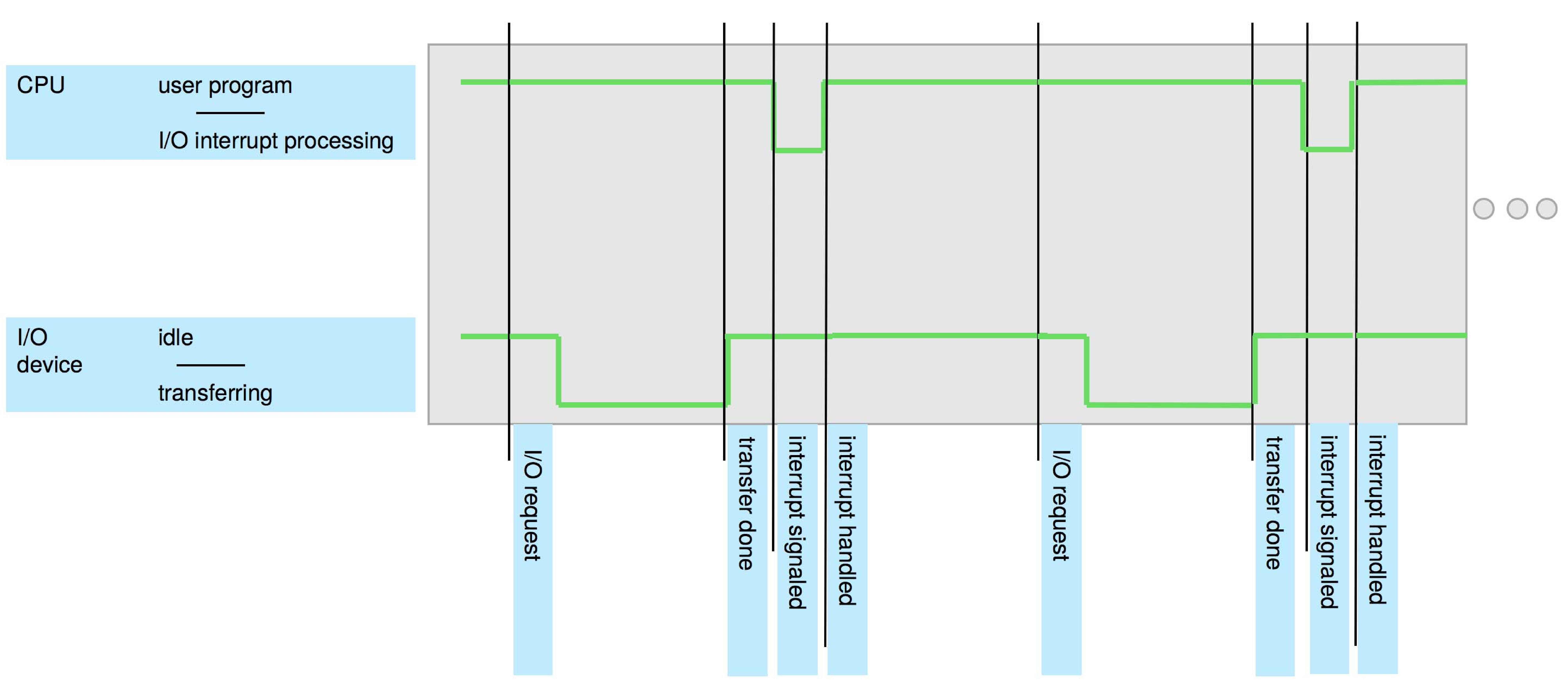
Interrupt Timeline
Interrupt Handling
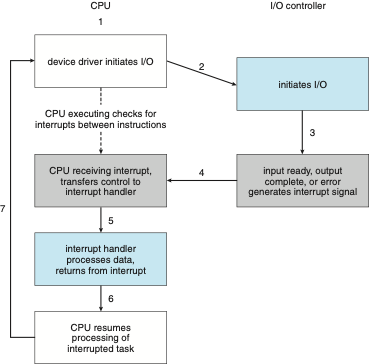
The CPU hardware has a wire called the interrupt-request line that the CPU senses after executing every instruction.
When the CPU detects (an asynchronous event) that a controller has asserted a signal on the interrupt-request line.
The operating system preserves the state of the CPU by storing the registers and the program counter
It reads the interrupt number and jumps to the interrupt-handler routine by using that interrupt number as an index into the interrupt vector.
It then starts execution at the address associated with that index.
It performs a state restore and executes a return from interrupt instruction to return the CPU to the execution state prior to the interrupt.
Interrupt-driven I/O Cycle
Interrupt-driven I/O Cycle
- Most CPUs have two interrupt request lines.
- One is the non-maskable interrupt, which is reserved for events such as unrecoverable memory errors.
- The second interrupt line is maskable: it can be turned off by the CPU before the execution of critical instruction sequences that must not be interrupted.
- The maskable interrupt is used by device controllers to request service.
- The interrupt mechanism also implements a system of interrupt priority levels.
- These levels enable the CPU to defer the handling of low-priority interrupts without masking all interrupts and makes it possible for a high-priority interrupt to preempt the execution of a low-priority interrupt.
Checking Interrupts on Linux OS
- The file / proc /interrupts contains information about the hardware interrupts in use and how many times processor has been interrupted
- watch -n1 “cat / proc /interrupts”
- The first column indicates the IRQ (Interrupt Request Line) number. Subsequent columns indicate how many interrupts have been generated for the IRQ number on different CPU cores. The last column provides information on the programmable interrupt controller that handles the interrupt.
- A small IRQ number value means higher priority.
Checking Interrupts on Linux OS
- The software interrupts are generated when the CPU executes an instruction which can cause an exception condition in the CPU [ALU unit] itself.
- watch -n1 “cat / proc /stat”
- The ” intr ” line gives counts of interrupts serviced since boot time, for each of the possible system interrupts.
Virtualizing Memory
- The physical memory is an array of bytes
- A program keeps all of its data structures in memory.
- Read memory (load)
- Specify an address to be able to access the data
- Write memory (store)
- Specify the data to be written to the given address
- Read memory (load)
- Each process accesses its own private virtual address space (Week 11)
Code Example
\\mem.c
#include <unistd.h>   // getpid(), sleep()
#include <stdio.h>
#include <stdlib.h>
#include <assert.h>
int main() {
    int *p = (int *)malloc(sizeof(int));
    assert(p != NULL);
    printf("(%d) address of p: %p\n", getpid(), (void *)p);
    *p = 0;
    for (int i = 0; i < 10; i++) {
        sleep(1);
        (*p)++;
        printf("(%d) address of p: %p | p: %d\n", getpid(), (void *)p, *p);
        fflush(stdout);
    }
    free(p);
    return 0;
}
On modern OS, the numerical virtual addresses may differ across processes, but the illusion of private physical memory remains intact.
Memory Virtualization: Illusion vs Reality
- Illusion (Process View)
- Each process believes it has its own private memory
- Memory references affect only the running program
- The process appears to have exclusive access to physical memory
- Reality (OS View)
- The OS maps each virtual address space onto physical memory
- Physical memory is a shared resource, managed by the OS
- The same physical frames may be safely shared across processes (e.g., read-only code, file-backed pages)
The problem of Concurrency
The OS is juggling many things at once, first running one process, then another, and so forth.
Modern multi-threaded programs also exhibit the concurrency problem. OS must handle concurrent events and untangle them as necessary.

Hide concurrency from independent processes
Manage concurrency from dependent processes by providing synchronization and communication primitives
Challenge: providing the right primitives
Code Example
\\threads.c
#include <stdio.h>
#include <stdlib.h>
#include <pthread.h>
#include <errno.h>
#include <string.h>

volatile int counter = 0;
int loops;
void *worker(void *arg) {
    (void)arg;
    for (int i = 0; i < loops; i++) {
        counter++;   // intentionally NOT atomic (race condition demo)
    }
    return NULL;
}
int main(int argc, char *argv[]) {
    if (argc != 2) {
        fprintf(stderr, "usage: threads <loops>\n");
        return 1;
    }
    loops = atoi(argv[1]);
    pthread_t p1, p2;
    printf("Initial value : %d\n", counter);
    pthread_create(&p1, NULL, worker, NULL);
    pthread_create(&p2, NULL, worker, NULL);
    pthread_join(p1, NULL);
    pthread_join(p2, NULL);
    printf("Final value   : %d\n", counter);
    return 0;
}
Code Example
\\threads.c
#include <stdio.h>
#include <stdlib.h>
#include <pthread.h>
#include <errno.h>
#include <string.h>

volatile int counter = 0;
int loops;
void *worker(void *arg) {
    (void)arg;
    for (int i = 0; i < loops; i++) {
        counter++;   // intentionally NOT atomic (race condition demo)
    }
    return NULL;
}
int main(int argc, char *argv[]) {
    if (argc != 2) {
        fprintf(stderr, "usage: threads <loops>\n");
        return 1;
    }
    loops = atoi(argv[1]);
    pthread_t p1, p2;
    printf("Initial value : %d\n", counter);
    pthread_create(&p1, NULL, worker, NULL);
    pthread_create(&p2, NULL, worker, NULL);
    pthread_join(p1, NULL);
    pthread_join(p2, NULL);
    printf("Final value   : %d\n", counter);
    return 0;
}
Code Example
\\threads.c
#include <stdio.h>
#include <stdlib.h>
#include <pthread.h>
#include <errno.h>
#include <string.h>

volatile int counter = 0;
int loops;
void *worker(void *arg) {
    (void)arg;
    for (int i = 0; i < loops; i++) {
        counter++;   // intentionally NOT atomic (race condition demo)
    }
    return NULL;
}
int main(int argc, char *argv[]) {
    if (argc != 2) {
        fprintf(stderr, "usage: threads <loops>\n");
        return 1;
    }
    loops = atoi(argv[1]);
    pthread_t p1, p2;
    printf("Initial value : %d\n", counter);
    pthread_create(&p1, NULL, worker, NULL);
    pthread_create(&p2, NULL, worker, NULL);
    pthread_join(p1, NULL);
    pthread_join(p2, NULL);
    printf("Final value   : %d\n", counter);
    return 0;
}
Concurrency Example
Inconsistent Result: We see the two threads when executed for large number produces inconsistent result. Why? Concurrency problem (Race Condition)?
- Increment a shared counter -> take three instructions (on worker(): counter++ (non-atomic)).
- edx = counter; // load from memory into register
- edx = edx + 1; // increment in register
- counter = edx; // store back to memory
- These three instructions do not execute atomically -> Problem of concurrency happen.
Assembly View of counter++
- objdump –disassemble-all thebinary
If two threads do this at the same time:
Thread A loads counter = 41
Thread B loads counter = 41
Thread A stores 42
Thread B stores 42
Any Solution to Concurrency?
- When there are many concurrently executing threads within the same memory space, how can we build a correctly working program?
- What primitives are needed from the OS? What mechanisms should be provided by the hardware?
- How can we use them to solve the problems of concurrency?
Code Example
\\threads_mutex.c
#include <stdio.h>
#include <stdlib.h>
#include <pthread.h>
#include <errno.h>
#include <string.h>

volatile int counter = 0;
int loops;
pthread_mutex_t lock = PTHREAD_MUTEX_INITIALIZER;
void *worker(void *arg) {
    (void)arg;
    for (int i = 0; i < loops; i++) {
        /* lock/unlock around the critical section */
        pthread_mutex_lock(&lock);
        counter++;   // now protected
        pthread_mutex_unlock(&lock);
    }
    return NULL;
}
int main(int argc, char *argv[]) {
    if (argc != 2) {
        fprintf(stderr, "usage: threads <loops>\n");
        return 1;
    }
    loops = atoi(argv[1]);
    pthread_t p1, p2;
    printf("Initial value : %d\n", counter);
    pthread_create(&p1, NULL, worker, NULL);
    pthread_create(&p2, NULL, worker, NULL);
    pthread_join(p1, NULL);
    pthread_join(p2, NULL);
    printf("Final value   : %d\n", counter);
    return 0;
}
Persistence - How to store information?
- Lifetime of information is greater than lifetime of a process.
- Enable processes to access non-volatile information (Week 12). Devices such as DRAM store values in a volatile
- Hardware and software are needed to store data persistently
- Hardware: I/O device such as a hard drive, solid state drives (SSDs)
- File system: the software in the operating system that usually manages the disk.
- File system is responsible for storing any files the user creates.
- Be resilient to failures (e.g., power loss)
- Provide access control
How to store information?
- What OS does in order to write to disk?
- Figure out where on disk this new data will reside
- Issue I/O requests to the underlying storage device
- File system handles system crashes during write.
- Journaling or copy-on-write
- Carefully ordering writes to disk
Security
OS is a gatekeeper, it ensures and enforces security. OS is also privileged and therefore frequently attacked.
- Isolate processes from each other and the OS
- Authenticate users (who is allowed to do what)
- Protect itself against malicious network/user input
- Harden program execution (through mitigations)
- Challenge: performance versus security
How a Modern Computer Works
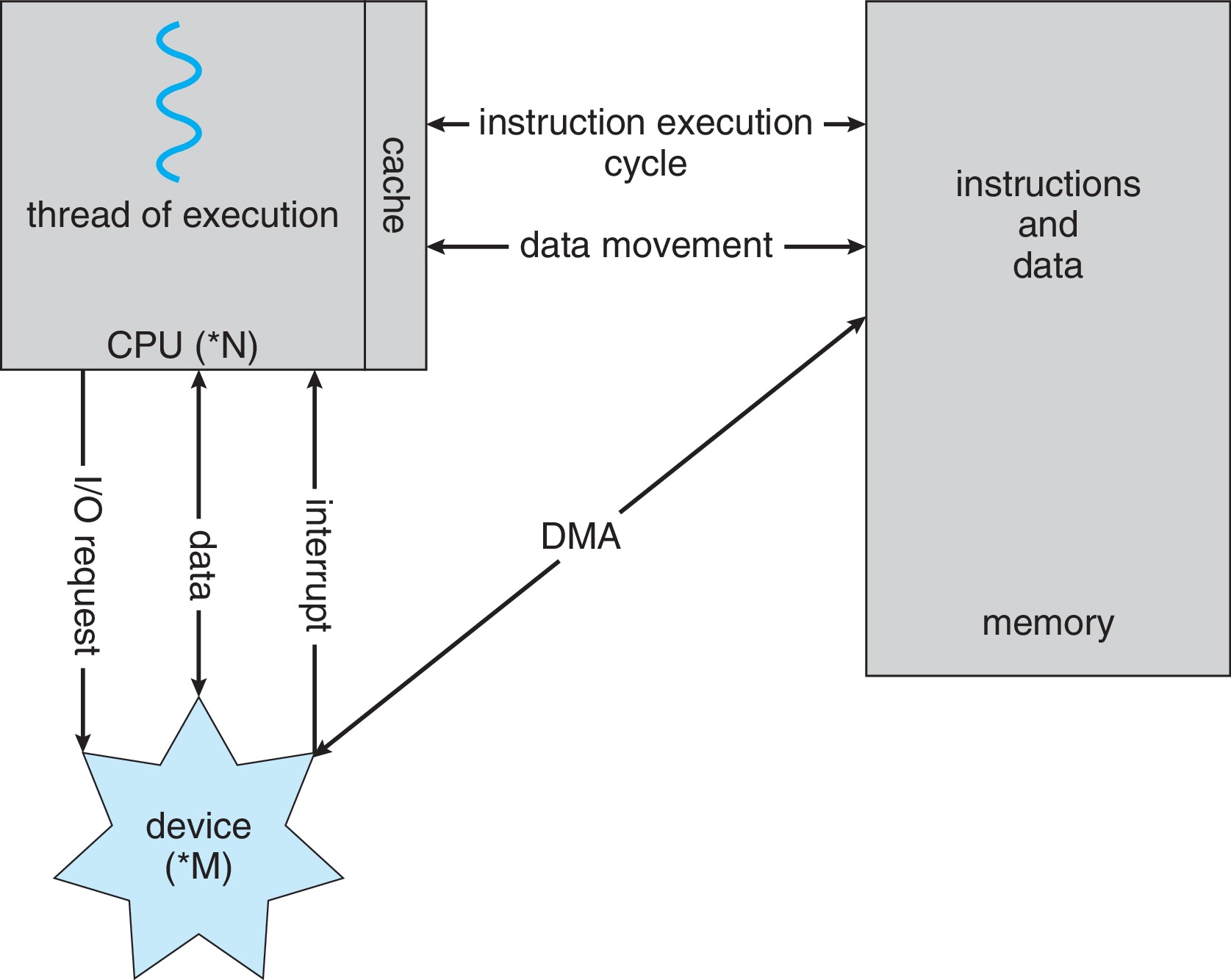
- Direct Memory Access Structure
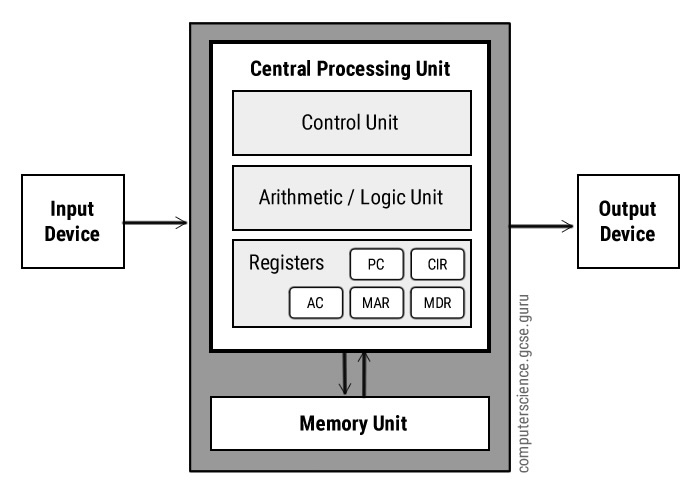
A Von Neuman’s Architecture
Computer-System Architecture
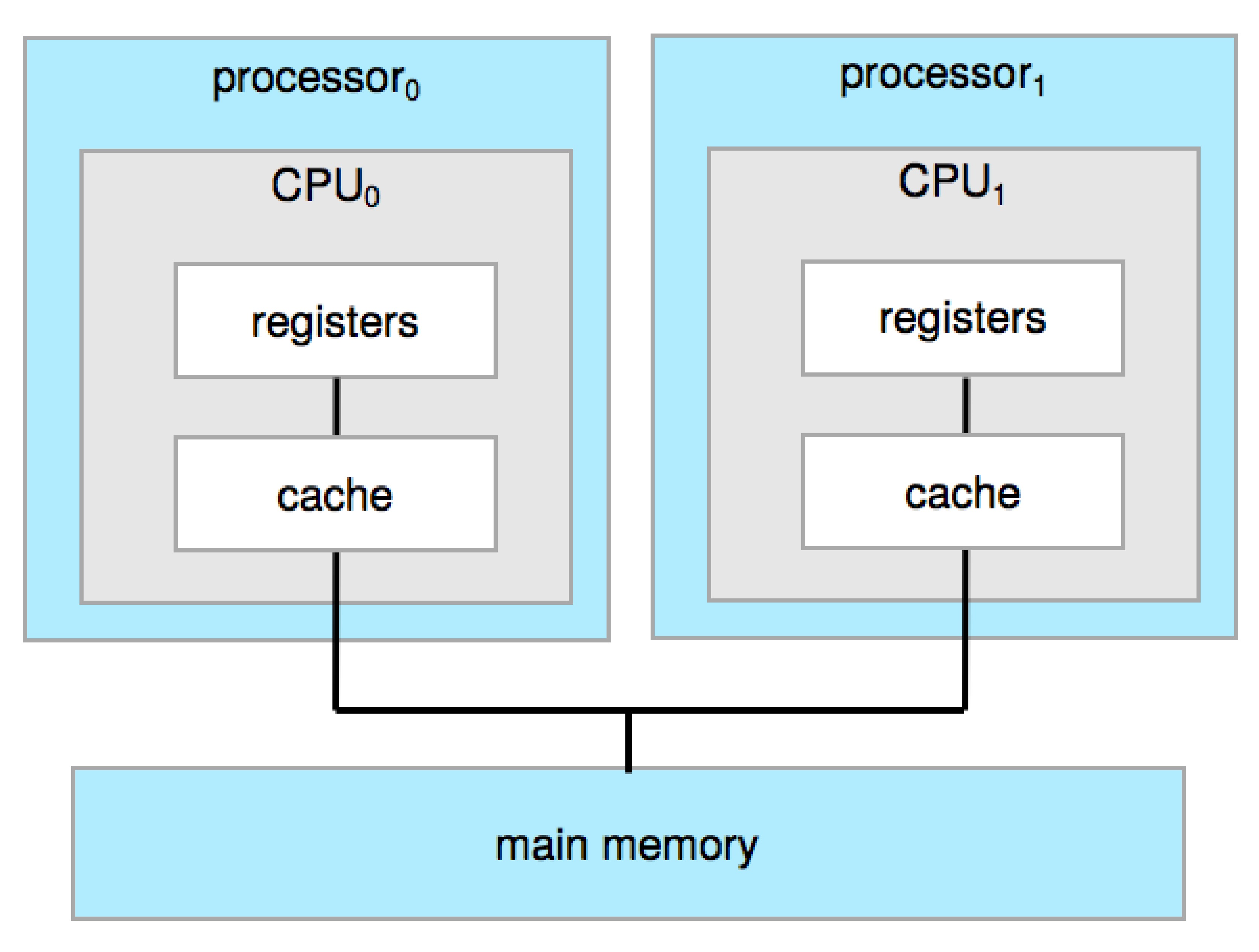
- Most systems use a single general-purpose processor containing one CPU with single processing core. The core can execute a general-purpose instruction set.
- Most systems have special-purpose processors as well, but that does not make it multiprocessor system.
- Multiprocessor’s systems growing in use and importance
- Also known as parallel systems, tightly-coupled systems
Computer-System Architecture
- Advantages include:
- Increased throughput
- Economy of scale
- Increased reliability – graceful degradation or fault tolerance
- Two types:
- Asymmetric Multiprocessing – each processor is assigned a specific task.
- Symmetric Multiprocessing – each processor performs all tasks
Symmetric Multiprocessing Architecture
Dual-Core Design
- Multi-chip and multicore
- Systems containing all chips
- Chassis containing multiple separate systems
- Systems containing all chips
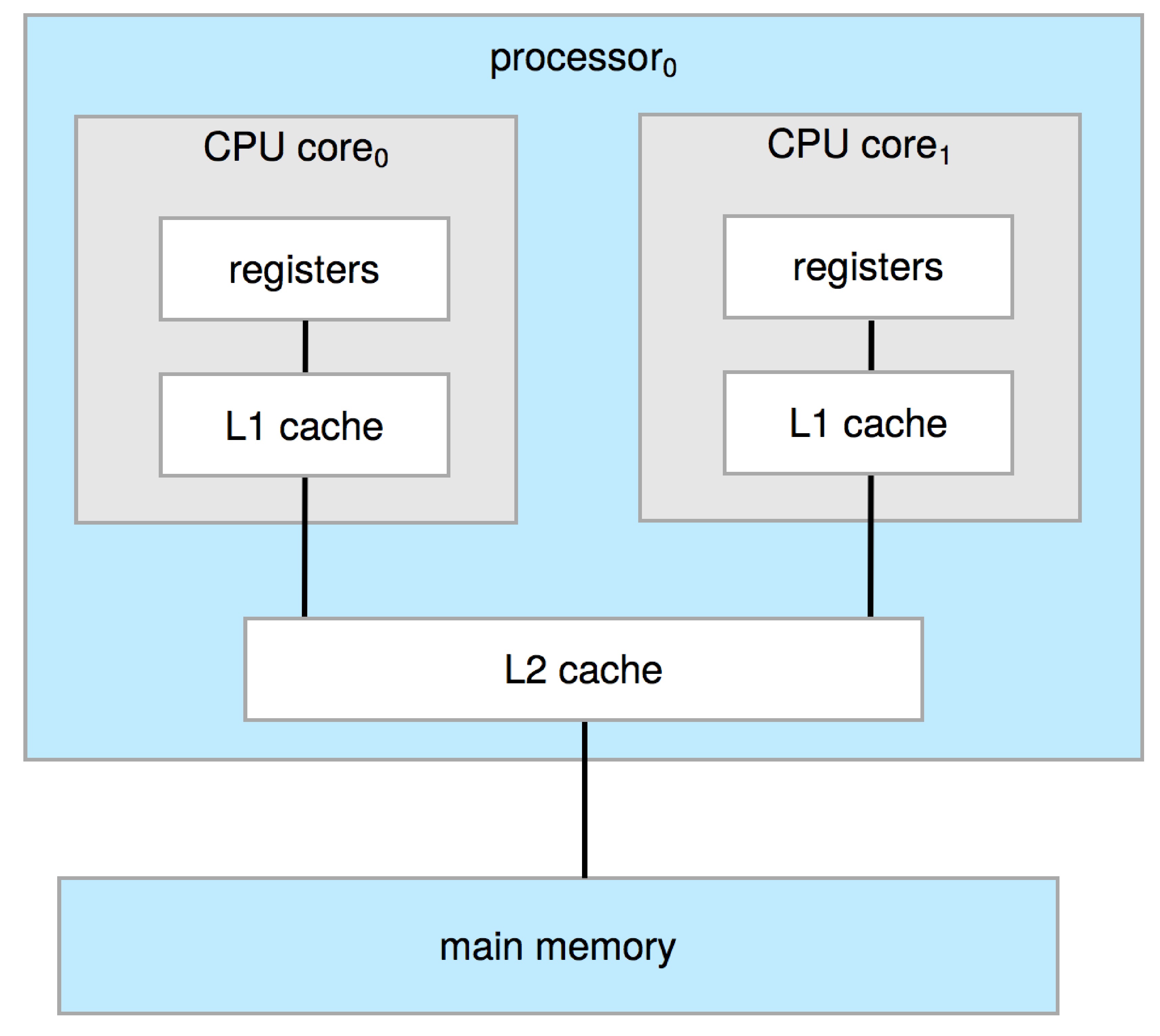
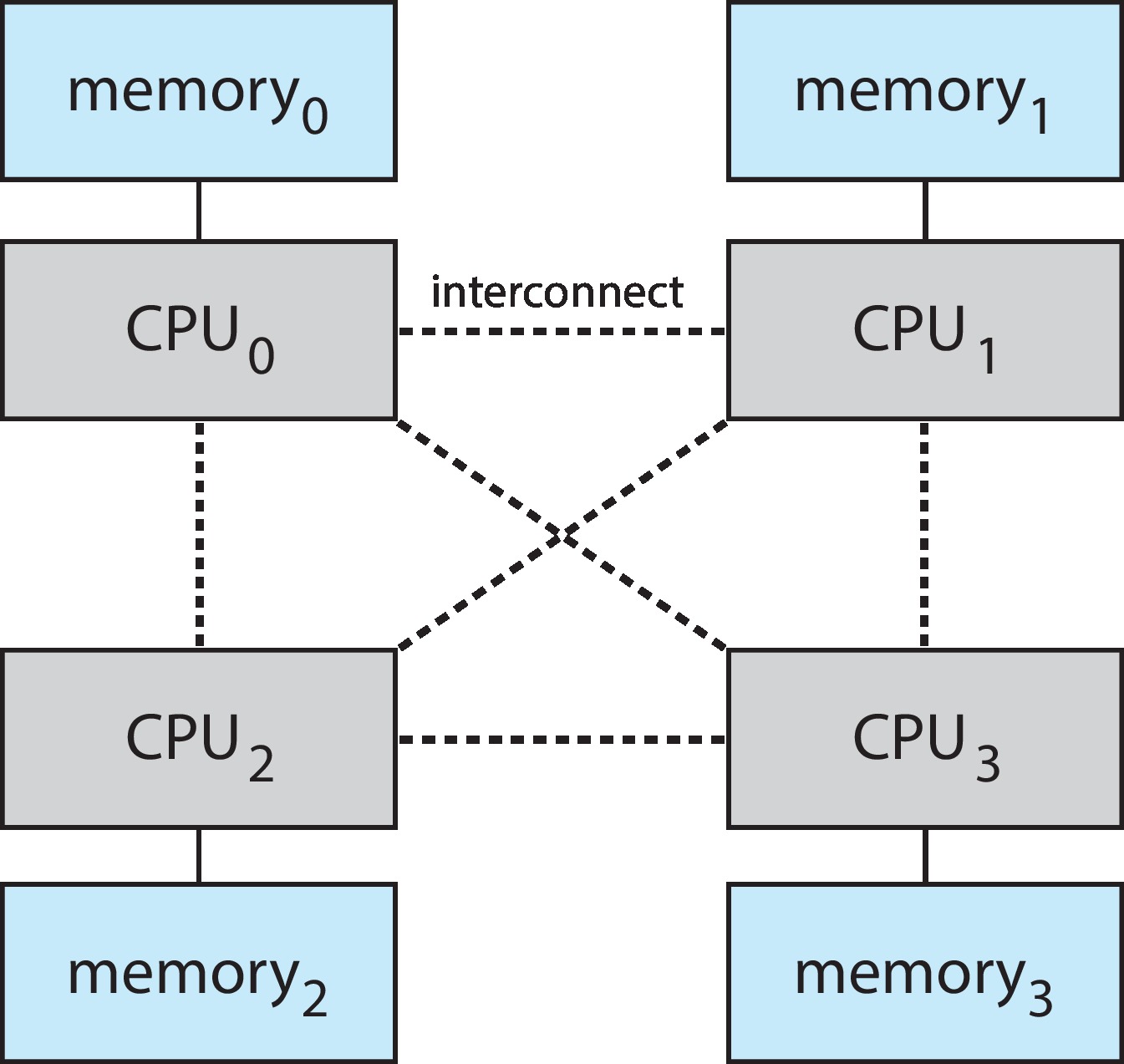
Non-Uniform Memory Access System
- The extent of sharing of storage can create different multi-processor systems.
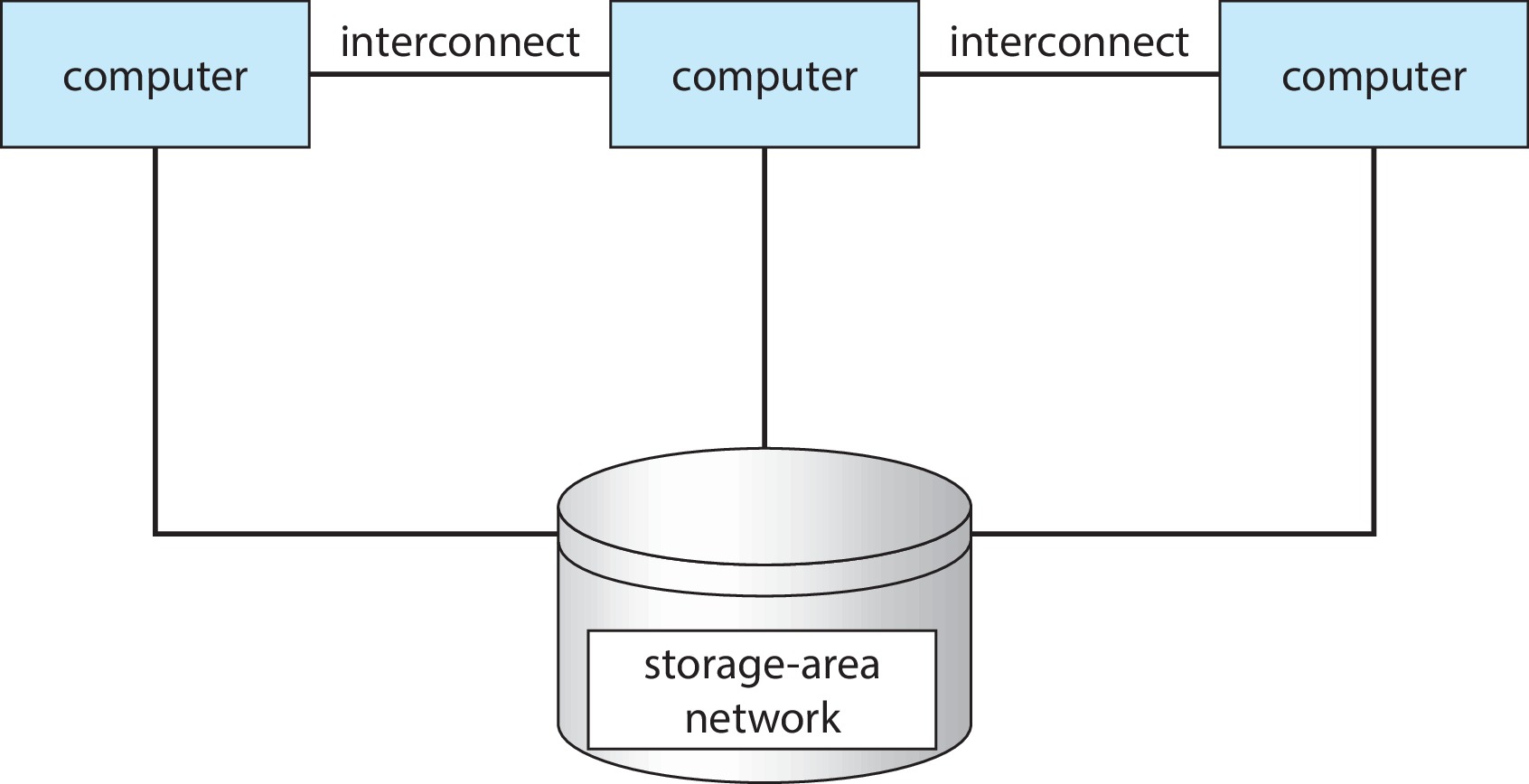
Clustered Systems
- Like multiprocessor systems, but multiple systems working together
- Usually sharing storage via a storage-area network (SAN)
- Provides a high-availability service which survives failures
- Asymmetric clustering has one machine in hot-standby mode
- Symmetric clustering has multiple nodes running applications, monitoring each other
- Some clusters are for high-performance computing (HPC)
- Applications must be written to use parallelization
- Some have distributed lock manager (DLM) to avoid conflicting operations
Clustered Systems
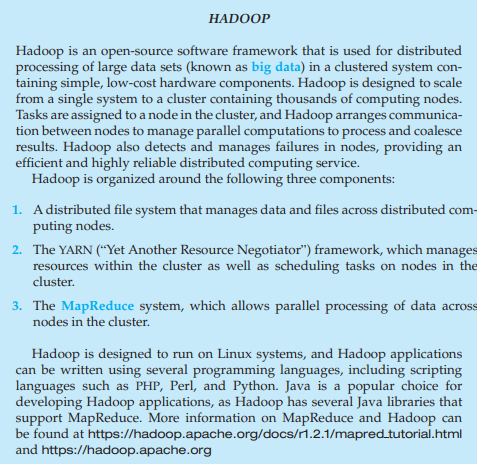
Hadoop
Operating-System Operations: Bootstrap
- Bootstrap program is loaded at power-up or reboot
- Typically stored in ROM or EPROM, generally known as firmware
- Initializes all aspects of system
- Loads operating system kernel and starts execution
Operating-System Operations:
- Kernel loads
- Starts system daemons (services provided outside of the kernel)
- Kernel interrupt driven (hardware and software)
- Hardware interrupt by one of the devices
- Software interrupt (exception or trap):
- Software error (e.g., division by zero)
- Request for operating system service – system call
- Other process problems include infinite loop, processes modifying each other or the operating system
Multiprogramming (Batch system)
- Single user cannot always keep CPU and I/O devices busy
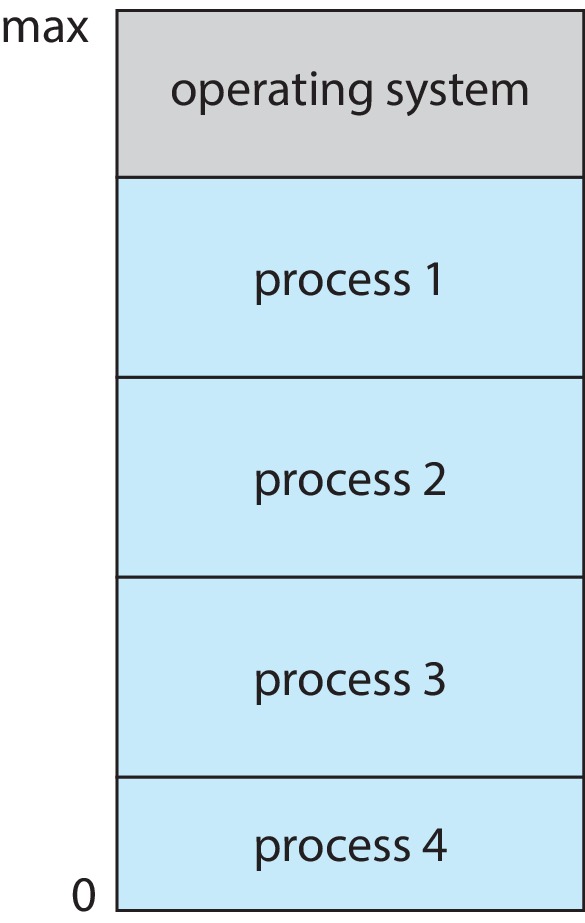
- Multiprogramming organizes jobs (code and data) so CPU always has one to execute
- A subset of total jobs in system is kept in memory
- One job selected and run via job scheduling When job has to wait (for I/O for example), OS switches to another job
Multitasking (Timesharing)
- A logical extension of Batch systems – the CPU switches jobs so frequently that users can interact with each job while it is running, creating interactive computing
- Response time should be < 1 second
- Each user has at least one program executing in memory process
- If several jobs ready to run at the same time then needs CPU scheduling
- If processes don ’t fit in memory, swapping moves them in and out to run
- Virtual memory allows execution of processes not completely in memory
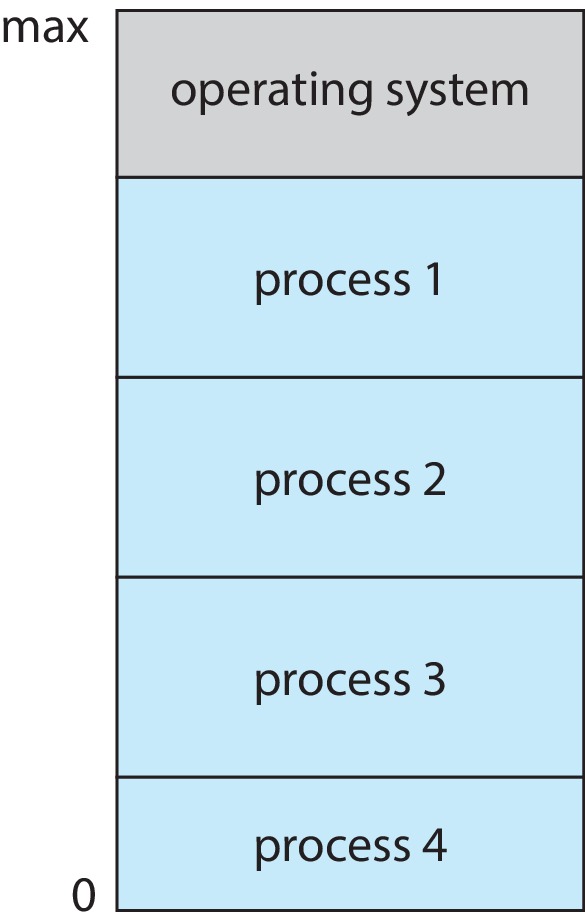
Memory Layout for Multiprogrammed System
Dual-mode Operation
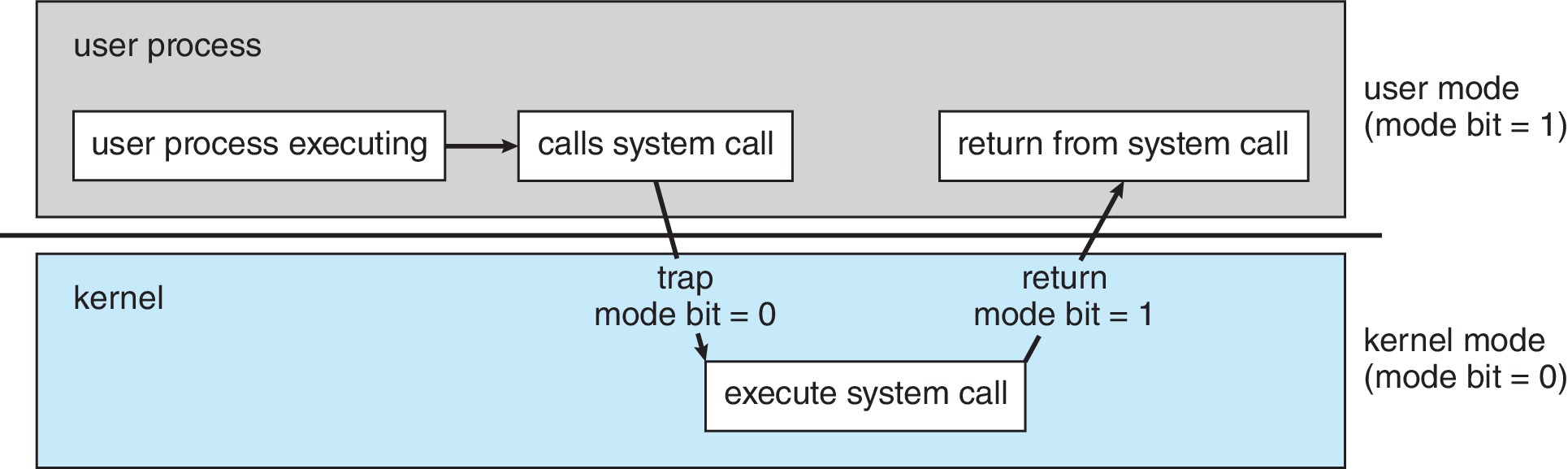
- Dual-mode (hardware supported) operation allows OS to protect itself and other system components
- User mode and kernel mode
- Mode bit provided by hardware
- Provides ability to distinguish when system is running user code or kernel code.
- When a user is running –> mode bit is “user”(1) When kernel code is executing –> mode bit is “kernel”(0)
Dual-mode Operation
How do we guarantee that user does not explicitly set the mode bit to “kernel”?
System call changes mode to kernel, return from call resets it to user
Transition from User to Kernel Mode
Summary
- Operating systems create the illusion of exclusive access to CPU, memory, and devices.
- Memory, CPU, and storage are virtualized to provide isolation, protection, and performance.
- These abstractions allow complex systems to work reliably, securely, and at scale.
References and Further Reading
Textbook: Chapter 1from Arpaci-Dusseau, Remzi H., and Andrea C. Arpaci-Dusseau,Operating Systems: Three Easy Pieces, 1.10 Edition, Arpaci-Dusseau Books, LLC, 2018.Reference: Chapter 1from A. Silberschatz, P.B. Galvin, and G. Gagne.Operating System Concepts, 10th Edition; 2018; John Wiley and Sons.
Thanks
🚀 Welcome to CP386 Course
🤔 Any Questions?