Process Management
What is a process?
- Process – a program in execution; process execution must progress in a sequential fashion
- Multiple parts
- The program code also called the text section
- Current activity including program counter, processor registers
- Stack containing temporary data
- Function parameters, return addresses, local variables
- Data section containing global variables
- Heap containing memory dynamically allocated during run time
Process
- The sizes of the text and data sections are fixed, as their sizes do not change during program run time.
- Stack and heap sections can shrink and grow dynamically during program execution.
- Each time a function is called an activation record containing function parameter is pushed onto the stack.
- Program is passive entity stored on disk ( executable file ), process is active
- Program becomes process when executable file loaded into memory
- One program can be several processes
- Each of these is a separate process; and although the text sections are equivalent, the data, heap, and stack sections vary.
Process in Memory
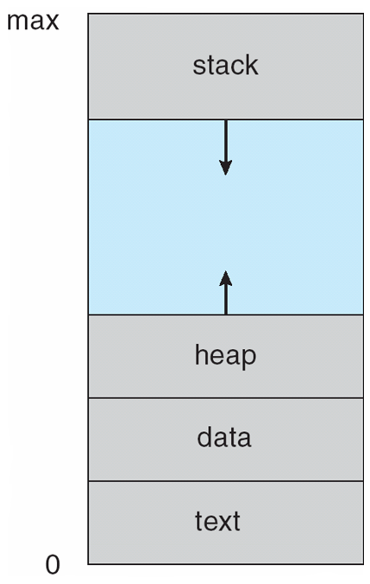
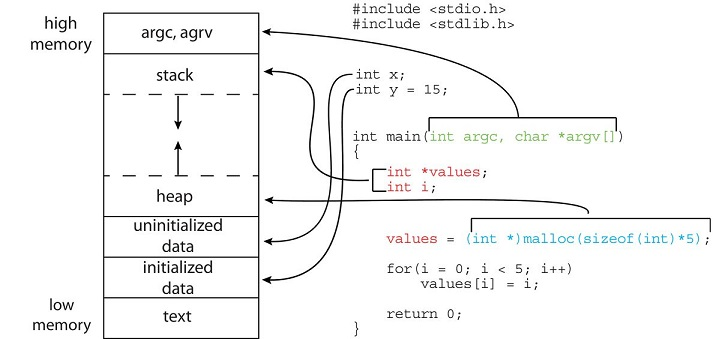
Process in Memory
The global data section is divided into different sections for (a) initialized data and (b) uninitialized data.
A separate section is provided for the argc and argv parameters passed to the main() function.
The data field refers to initialized data, and bss refers to uninitialized data. (bss is a historical term referring to block started by symbol).
The GNU
sizecommand can be used to determine the size (in bytes) of some of these sections.
Process State
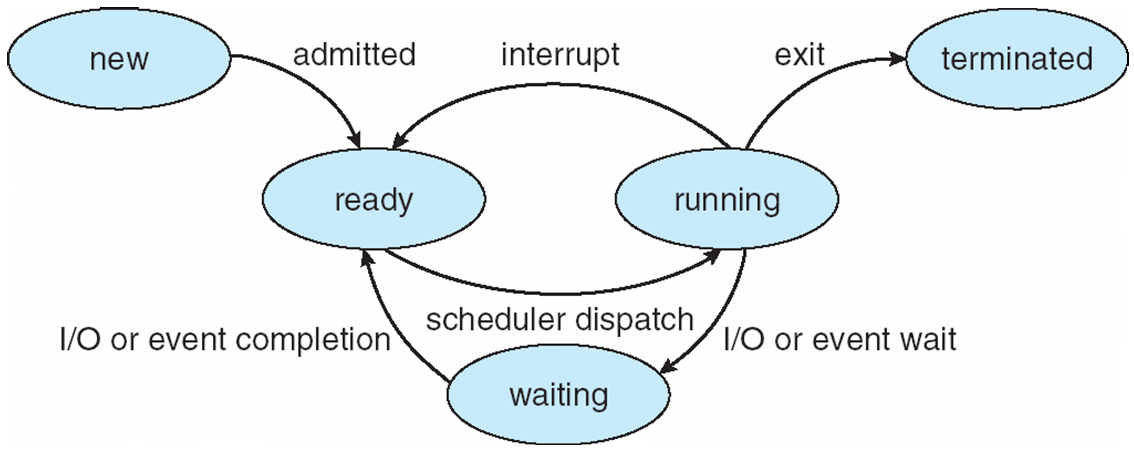
- new: The process is being created
- running: Instructions are being executed
- waiting: The process is waiting for some event to occur
- ready: The process is waiting to be assigned to a processor
- terminated: The process has finished execution
Process Control Block (PCB)
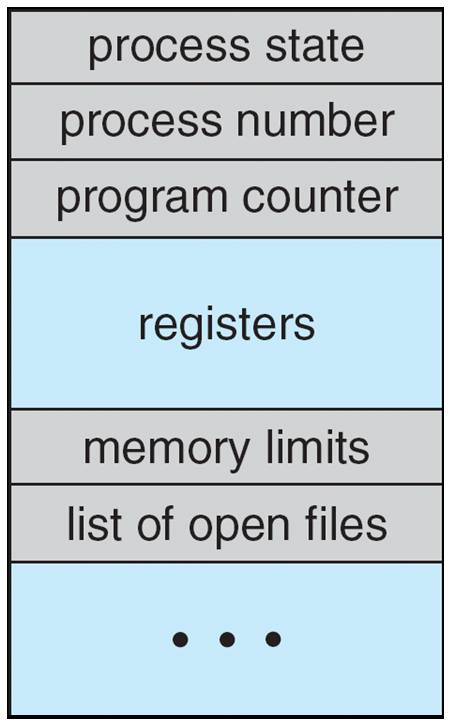
- Information associated with each process (also called task control block )
- Process state – running, waiting, etc
- Program counter – location of instruction to next execute
- CPU registers – contents of all process-centric registers
Process Control Block (PCB)
- CPU scheduling information- priorities, scheduling queue pointers
- Memory-management information – memory allocated to the process
- Accounting information – CPU used, clock time elapsed since start, time limits
- I/O status information – I/O devices allocated to process, list of open files ![]
- Finer control, we will discuss in next chapter.
Process Representation in Linux
- Represented by the C structure task_struct pid t_pid;
pid t_pid; /* process identifier */
long state; /* state of the process */
unsigned int time_slice; /* scheduling information */
struct task_struct* parent; /* this process ’ s parent */
struct list_head children; /* this process ’ s children */
struct files_struct* files; /* list of open files */
struct mm_struct* mm; /* address space of this process */ 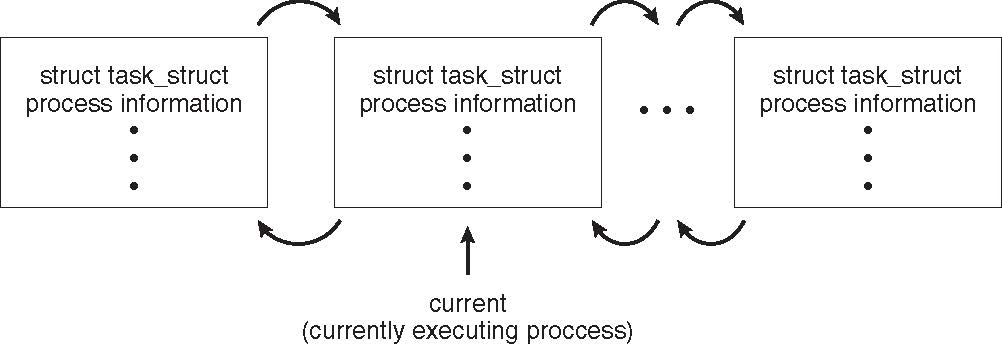
Process Scheduling
- Maximize CPU use, and quickly switch processes onto CPU for time sharing.
- The number of processes currently in memory is known as the degree of multiprogramming.
- Process scheduler selects among available processes for next execution on CPU Generally, most processes can be either I/O bound or CPU bound.
Process Scheduling
- A new process is initially put in the ready queue.
- It waits there until it is selected for execution, or dispatched.
- Once the process is allocated a CPU core and is executing, one of several events could occur:
- The process could issue an I/O request and then be placed in an I/O wait queue.
- The process could create a new child process and then be placed in a wait queue while it awaits the child’s termination.
- The process could be removed forcibly from the core, as a result of an interrupt or having its time slice expire, and be put back in the ready queue.
- In the first two cases, the process eventually switches from the waiting state to the ready state and is then put back in the ready queue.
- A process continues this cycle until it terminates, at which time it is removed from all queues and has its PCB and resources deallocated.
Context Switch
Context Switch
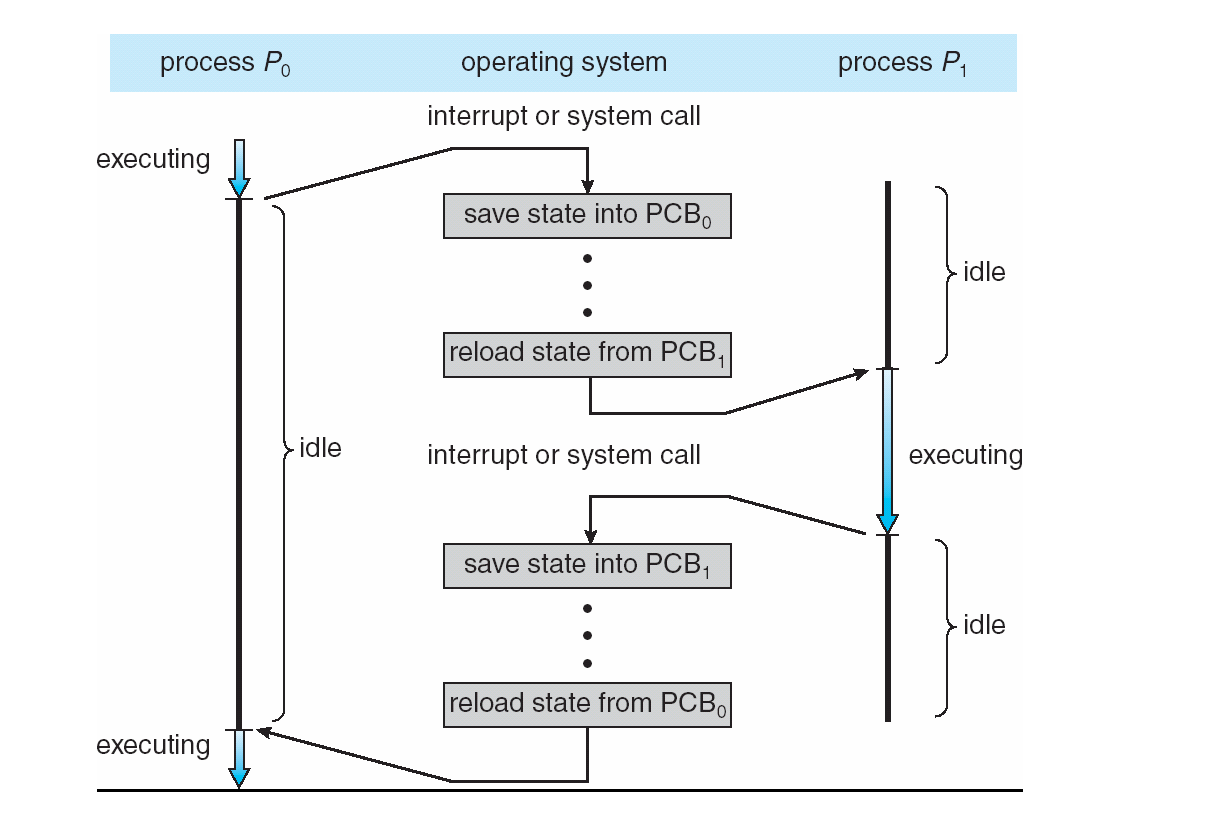
- When CPU switches to another process, the system must save the state of the old process and load the saved state for the new process via a context switch.
- The context of a process is represented in the Process Control Block (PCB).
- The complexity of the operating system and the PCB can affect the duration of the context switch.
- The time required for a context switch is dependent on hardware support.
- Some hardware provides multiple sets of registers per CPU, allowing multiple contexts to be loaded at once.
- Switching the CPU core from one process to another is known as a context switch.
- During a context switch, the current process’s state is saved, and the state of a different process is restored.
Operations on Processes
- System must provide mechanisms for: process creation, process termination, and so on
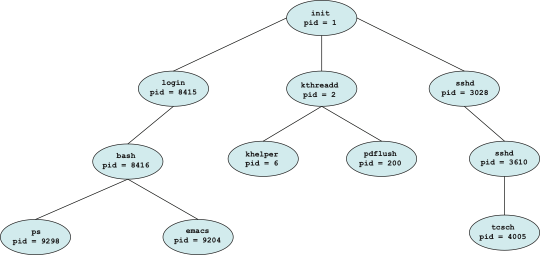
- Parent process create children processes, which, in turn create other processes, forming a tree of processes Generally, process identified and managed via a process identifier (pid)
- Resource sharing options Parent and children share all resources
- Children share subset of parent ’ s resources Parent and child share no resources
- Execution options:
- Parent and children execute concurrently
- Parent waits until children terminate
A Tree of Processes in Linux
Process Creation (Cont.)
- Address space
- Child duplicate of parent
- Child has a program loaded into it
- System Calls:
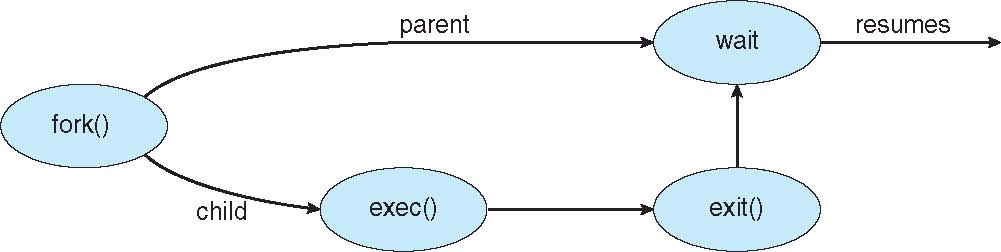
- fork() system call creates new process
- exec() system call used after a fork() to replace the process’ memory space with a new program
System Calls
System call is the services provided by Linux kernel.
In C programming, it often uses functions defined in libc which provides a wrapper for many system calls. Manual page section 2 provides more information about system calls.
To get an overview, use “man 2 intro” in a command shell. You can find the list of system calls in the file /usr/include/sys/syscall.h.
It is also possible to invoke syscall() function directly. Each system call has a function number defined in <syscall.h> or <unistd.h>.
fork() System Call
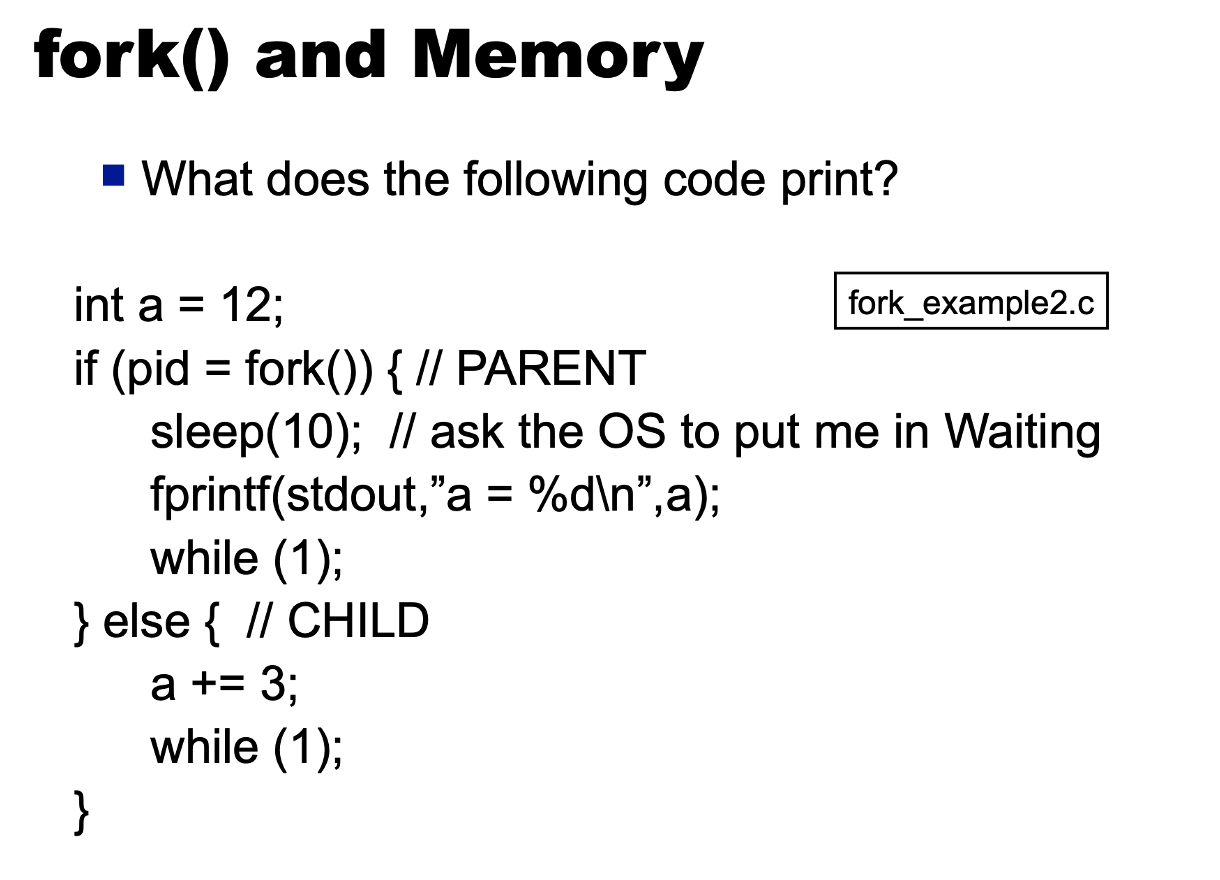
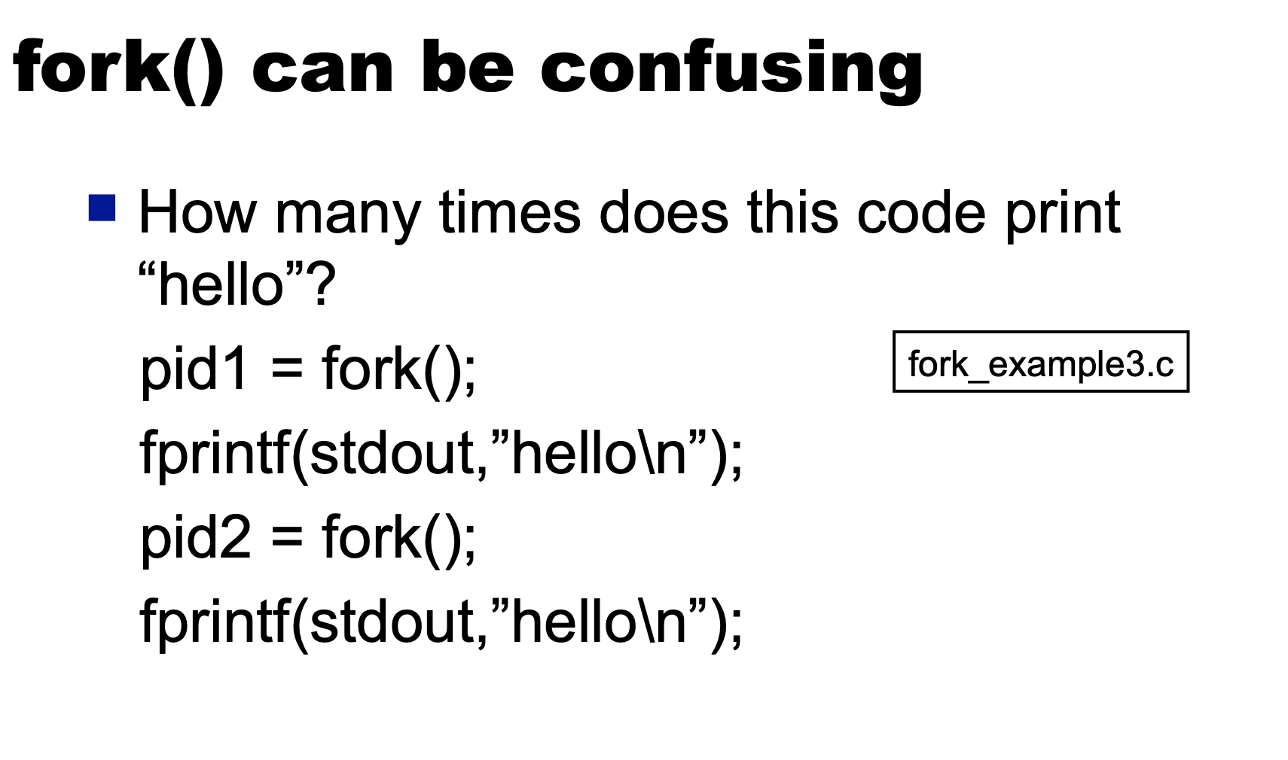
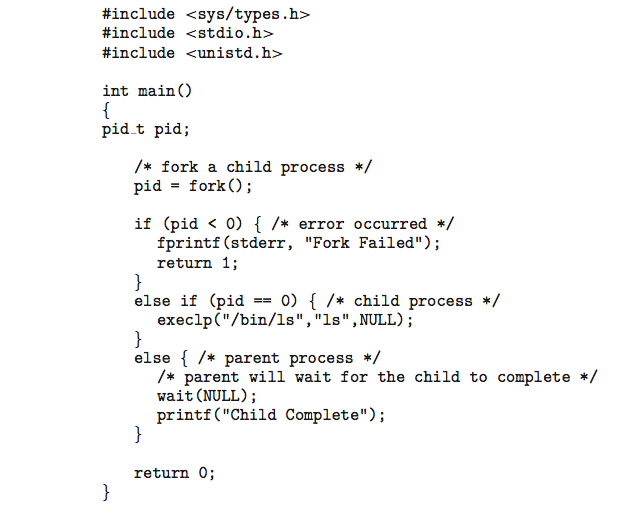
- The fork() system call creates a new process that is copy of the parent process that is calling fork().
- This is the only way to create a new process in UNIX:
- it returns: ● ret == 0 in the child process ● ret == pid > 0 in the parent process. ● ret < 0 if there is an error
fork() System Call
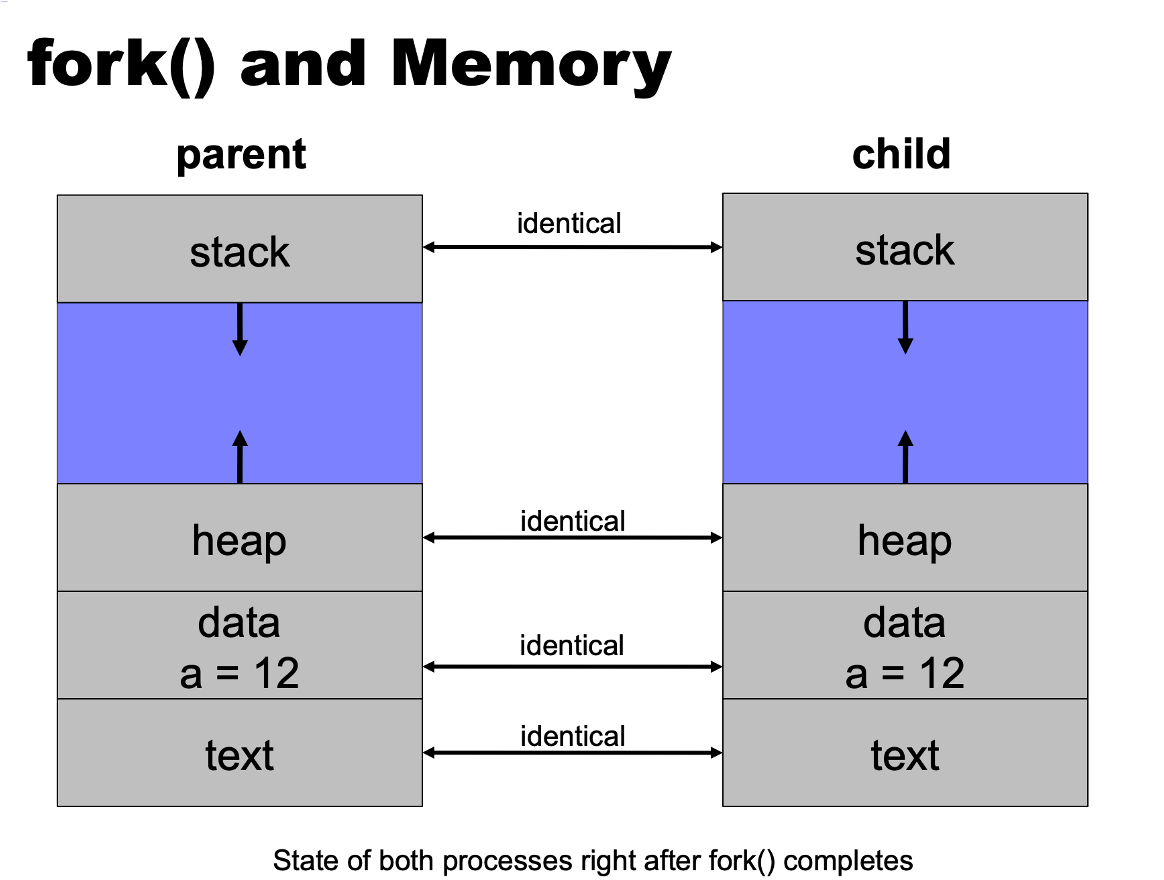
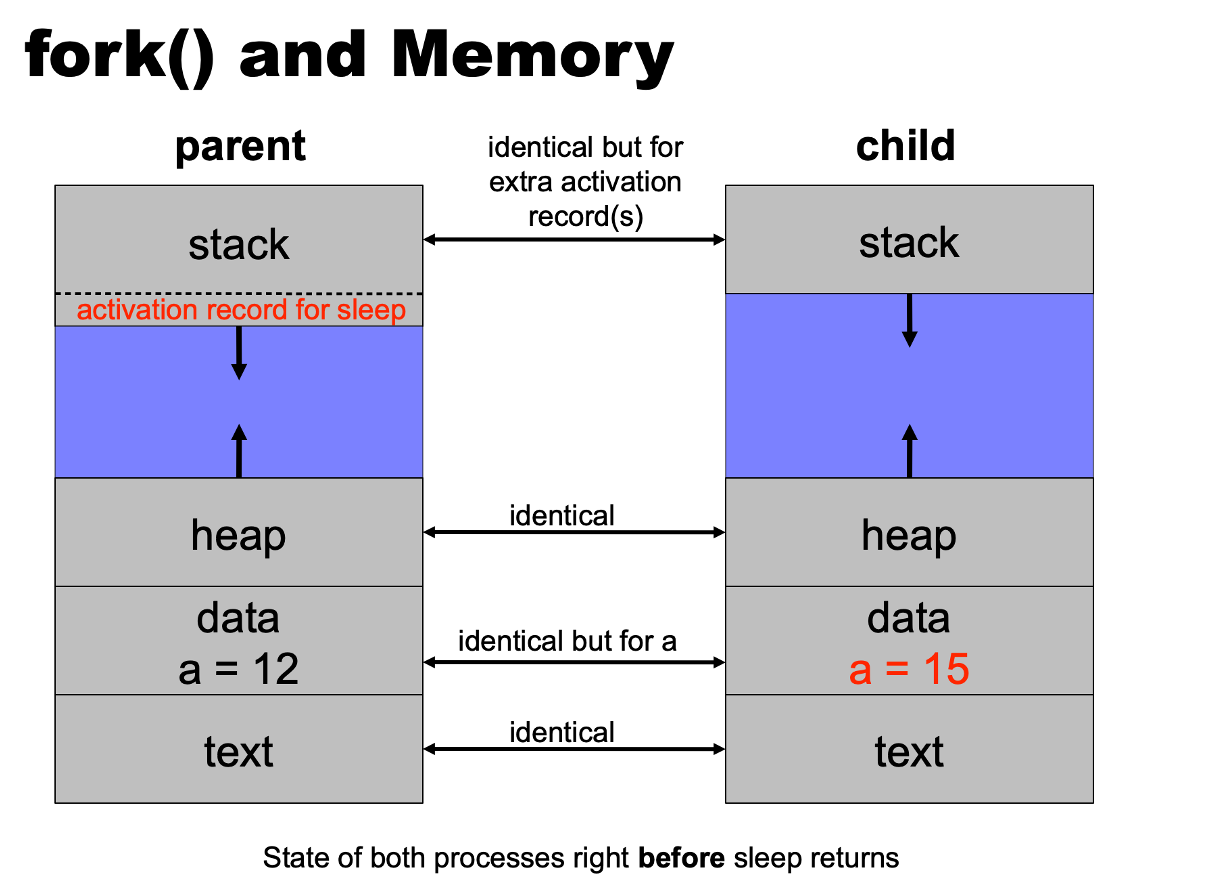
- The memory in the child process is a copy of the parent process’s memory.
- This copy is optimized by using VM copy on write, that is, the memory of the parent will be shared with the child keeping only one copy the memory in physical memory.
- Only when one page is modified by either the parent or the child, the OS will make a copy of the modified page.
- This “lazy” copy improves the execution of fork() since most of the time only a few pages are modified. During fork() the Open File table is copied in the child.
- However, the Open File objects of the parent are shared with the child. This allows the communication between the parent and the children. Only the reference counters of the Open File Objects are increased.
fork() System Call contd…

fork() System Call contd…
fork() System Call contd…
fork() System Call contd…
fork() System Call contd…
exec System Call Family
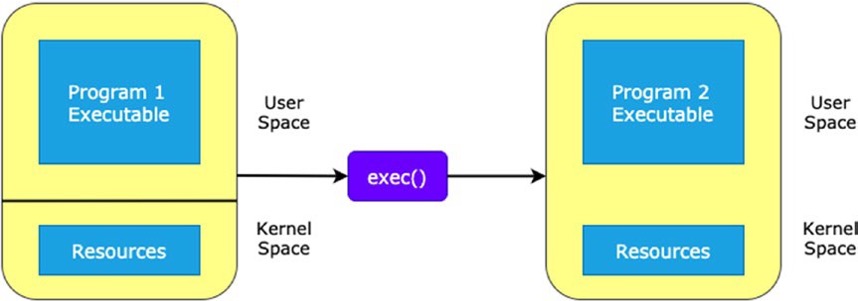
- The exec system call family replaces the currently running process with a new process.
- But the original process identifier remains the same, and all the internal details, such as stack, data, and instructions, the new process replaces the executable.
- This function call family runs binary executable and shell scripts.
- There are several system calls of the same family type available in the
unistd.hlibrary. - They create a new process or execute another binary executable. The family of the exec system call functions include the following.
exec System Call Family
exec System Call Family
execl
execlp
execle
execv
execvp
execve
execl( )
This system call takes the first and second parameter as a path of the binary executable. and the remaining parameters are the ones that you need to pass as based on your interest; that is, optional parameters or flags that are required for the executable program and purpose followed by a NULL value.
This system call is available in the unistd.h library. The return type of this function is an integer. If the execution is unsuccessful, it returns
-1; otherwise, it returns nothing. The following shows the syntax.
path takes the binary executable with the complete path.
arg also takes the binary executable path as an argument.
[...] considers the variable number of arguments, which means you can pass any number of arguments.
NULL is the default parameter, which the execl function’s last parameter should be.
execlp( )
This system call is a bit more advanced than the execl() system call.
It does not require the path for the binary built-in executable, but for custom executable, it does require the path to execute.
The return type of this system call is an integer. It returns –1 if any error occurs and returns anything for successful execution. The following shows the syntax.
path takes the binary executable with the complete path.
arg also takes the binary executable path as an argument.
[...] considers the variable number of arguments, which means you can pass any number of arguments.
NULL is the default parameter, which the execl function’s last parameter should be.
execle( )
This system call works similarly to the execl() system call.
The major difference is that you can pass your own environment variables as an array. You can access the environment variables from the envp constant array pointer.
The return type of this system call is an integer. It returns –1 on an error and returns anything for the successful execution of the executable. The following shows the syntax.
path takes the binary executable with the complete path.
arg also takes the binary executable path as an argument.
[...] considers the variable number of arguments, which means you can pass any number of arguments.
NULL is the default parameter, which the execl function’s last parameter should be.
envp is an environment pointer variable that lets you access the environment variables from the array. The last element of the array is a NULL value.
execv( )
This execv() system call is slightly different from this all three system calls.
In this system call you can pass your parameters as an argv array that you want to execute.
The last element of this array is a
NULLvalue.The return type of this system call is an integer value. It returns -1 on an error and returns nothing on success. The following shows the syntax.
The path argument points to the path of the executable that is being executed.
argv is the second argument. It is a NULL-terminated array of character pointers.
execvp( )
This system call works the as same as the execv() system call.
The major difference is that you don’t need to pass the path for system executables like an execlp() system call.
The execvp() system call tries to find the path of the file in an operating system, for example, the ls command is a program name. The execvp() system call automatically finds its path in the system and performs the action. The following shows the syntax.
file points to the executable file name associated with the file being executed.
argv is a NULL-terminated array of character pointers that contain the executables information.
execve( )
This system call works the same as the execle() system call.
You can pass the environment variables, and those variables can access it from your program.
Example
- The following shows the syntax.
wait System Call
A process needs to wait for resources or for other processes to complete execution.
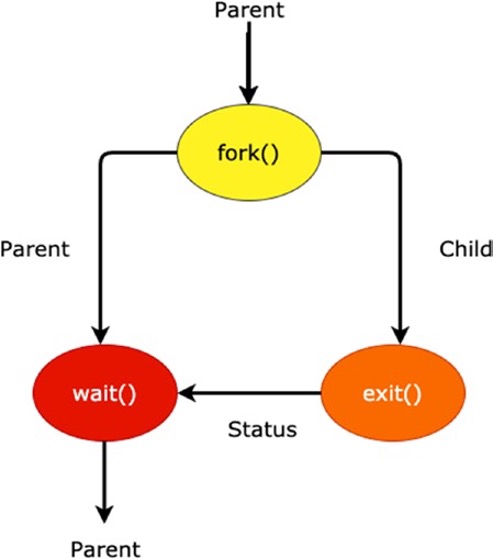
A common situation that occurs during the creation of a child process is that the parent process needs to wait or suspend until the child process execution is completed.
After the child process execution completes, the parent process resumes execution. The work of the wait system call is to suspend the parent system call until its child process terminates.
This wait system call is available in the sys/wait.h header file.
The process ID is the return type of the wait system call. On successful termination of the child process, it returns the child process ID to the parent process.
wait System Call
If the process doesn’t have any child processes, the initiated wait call does not affect the parent activity.
It returns -1 if there are no child processes. If the parent process has multiple child processes, the wait() call returns the appropriate result to the parent when the child processes have terminated.
wait System Call
- The following shows the syntax.
- This system call takes the child status as an argument and returns the terminated child process ID. If you don’t want to give the child status, you can use the NULL value.
Process Termination - exit System Call
- It is available in the stdlib.h library.
- The return of this system call is void. It doesn’t return anything on execution.
- It is used to terminate the normal execution of the program while encountered the exit () function.
- We can use the exit() function to flush or clean all open stream data like read or write with unwritten buffered data.
- It closed all opened files linked with a parent or another function or file and can remove all files created by the tmpfile function.
exit System Call
- The program’s behaviour is undefined if the user calls the exit function more than one time or calls the exit and quick_exit function.
- The following shows the syntax:
void exit(int status) - The exit function is categorized into two parts: exit(0) and exit(1). The
statustakes the value that is returned to the parent process. It can also be EXIT_SUCCESS and EXIT_FAILURE to represent the successful termination (0) and abnormally terminate the program (1), respectively.
C Program Forking Separate Process
Process Termination
- Process executes last statement and then asks the operating system to delete it using the exit() system call.
- Returns status data from child to parent (via wait() )
- Process’ resources are deallocated by operating system Parent may terminate the execution of children processes using the abort() system call.
- Some reasons for doing so:
- Child has exceeded allocated resources Task assigned to child is no longer required
- The parent is exiting and the operating systems does not allow a child to continue if its parent terminates
Process Termination
- Some operating systems do not allow child to exists if its parent has terminated. If a process terminates, then all its children must also be terminated
- Cascading termination - All children, grandchildren, etc. are terminated. The termination is initiated by the operating system.
- The parent process may wait for termination of a child process by using the wait() system call.
- The call returns status information and the pid of the terminated process pid = wait(&status);
Zombie Process
- When a process terminates, its resources are deallocated by the operating system. However, its entry in the process table must remain there until the parent calls wait(), because the process table contains the process’s exit status.
- A zombie process is a process that has finished executing but still has an entry in the process table, as if no parent waiting (did not invoke wait() ) process.
- Generally, all processes transition to this state only briefly, once the parent calls the wait(), the process identifier of the zombie process and its entry in the process table would be released.
Orphan Process
- An orphan process is a child process that continues to run even after its parent process has terminated.
- A child process becomes an orphan when either of the following occurs.
- When the task of the parent process finishes and terminates without terminating the child process.
- When an abnormal termination occurs in the parent process.
Interprocess Communication
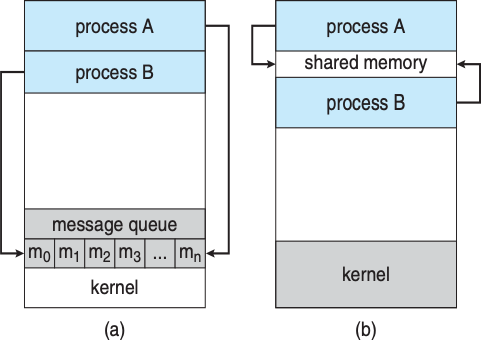
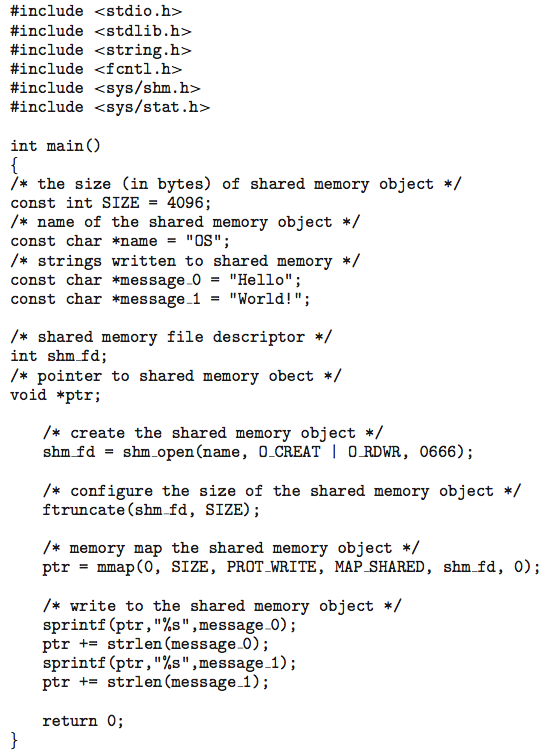
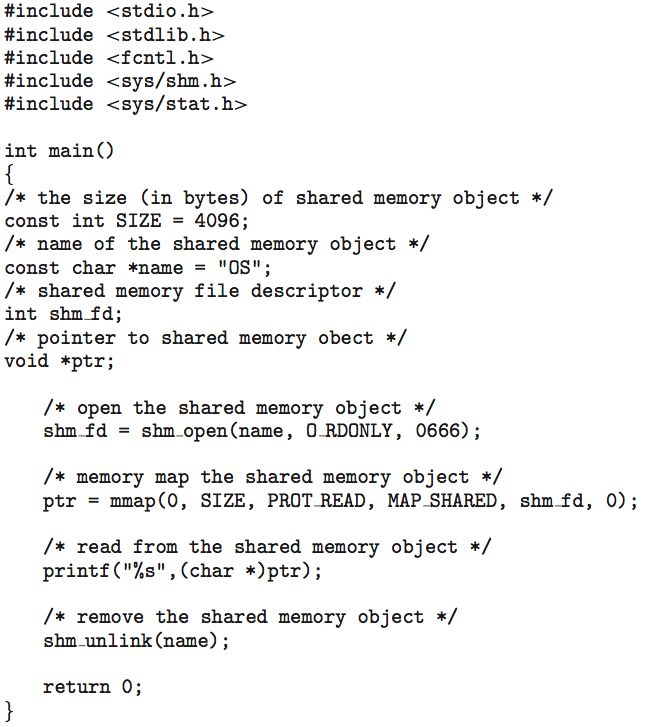
- Cooperating processes may need to communicate with each other. Two models of interprocess communication are shared memory and message passing.
- Shared Memory: In shared memory, processes can access a shared memory region without the need for system calls. It is faster than message passing but requires synchronization.
- Message Passing: Message passing involves using system calls to send and receive messages between processes. It is easier to implement but slower than shared memory.
- Some applications, like the Google Chrome browser, use a multiprocess architecture where different processes handle different tasks, such as user interface, rendering, and plugins.
Communications Models
Classical Producer-Consumer Problem
- For cooperating processes, producer process produces information that is consumed by a consumer process
- Unbounded-buffer places no practical limit on the size of the buffer. Consumer may have to wait()
- Bounded-buffer assumes that there is a fixed buffer size. Cosumer may have to wait if it is empty and producer may have to wait if it is full.
Bounded-Buffer
- Shared data #define
#define BUFFER_SIZE 10
typedef struct {
    . . .
} item;

item buffer[BUFFER_SIZE];
int in = 0;
int out = 0;
The variable in points to the next free position in the buffer; out points to the first full position in the buffer. The buffer is empty when in == out; the buffer is full when ((in + 1) % BUFFER_SIZE) == out.
Solution is correct, but can only use BUFFER_SIZE-1 elements.
Bounded-Buffer - Producer
Bounded-Buffer - Consumer
Interprocess Communication
- The mechanism for processes to communicate and synchronize their actions
- Message system – processes communicate with each other without resorting to shared variables
- IPC facility provides two operations:
- send(message)
- receive(message)
- The message size is either fixed or variable Implementing the variable size message are complex but makes the programmers life easier
- Direct Communication
- Indirect Communication
IPC POSIX Producer
IPC POSIX Consumer
Standard File Descriptors
In Linux, there are 3 standard file descriptors. They are:
- stdin: This is the standard input file descriptor. It is used to take input from the terminal by default. scanf(), getc() etc functions uses stdin file descriptor to take user inputs. The stdin file descriptor is also represented by the number 0.
- stdout: This is the standard output file descriptor. It is used to print something to the console/terminal by default. The widely used printf() function uses stdout to print your desired output to the console/terminal. The stdout file descriptor is also represented by the number 1.
Standard File Descriptors
- stderr:
This is the standard error file descriptor. It does the same thing as the stdout file descriptor.
The stderr file descriptor is used to print error messages on the console/terminal.
The only difference is if you use stderr file descriptor to print the error messages, and stdout file descriptor to print normal outputs, then you can later separate them.
For example, you can redirect the error messages to a file and normal outputs to the console or another file. The stderr file descriptor is also represented by the number 2.
Pipes
Acts as a conduit allowing two processes to communicate.
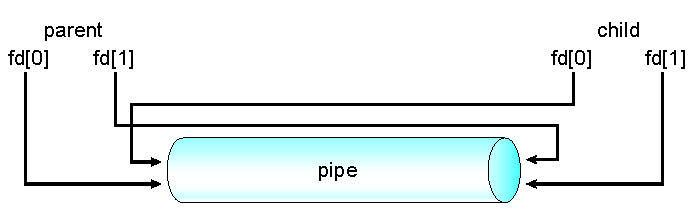
Ordinary pipes – cannot be accessed from outside the process that created it.
- Typically, a parent process creates a pipe and uses it to communicate with a child process that it created.
- Once the processes have finished communication and have terminated the pipe ceases to exist.
Named pipes can be accessed without a parent-child relationship.
A common visual analogy for a pipe is a real-world water pipe; water that is poured into one end of the pipe comes out the other end.
Pipes cond..

Pipes cond..
Ordinary Pipes
- Ordinary Pipes allow communication in standard producer-consumer style
- Producer writes to one end (the write-end of the pipe)
- Consumer reads from the other end (the read-end of the pipe)
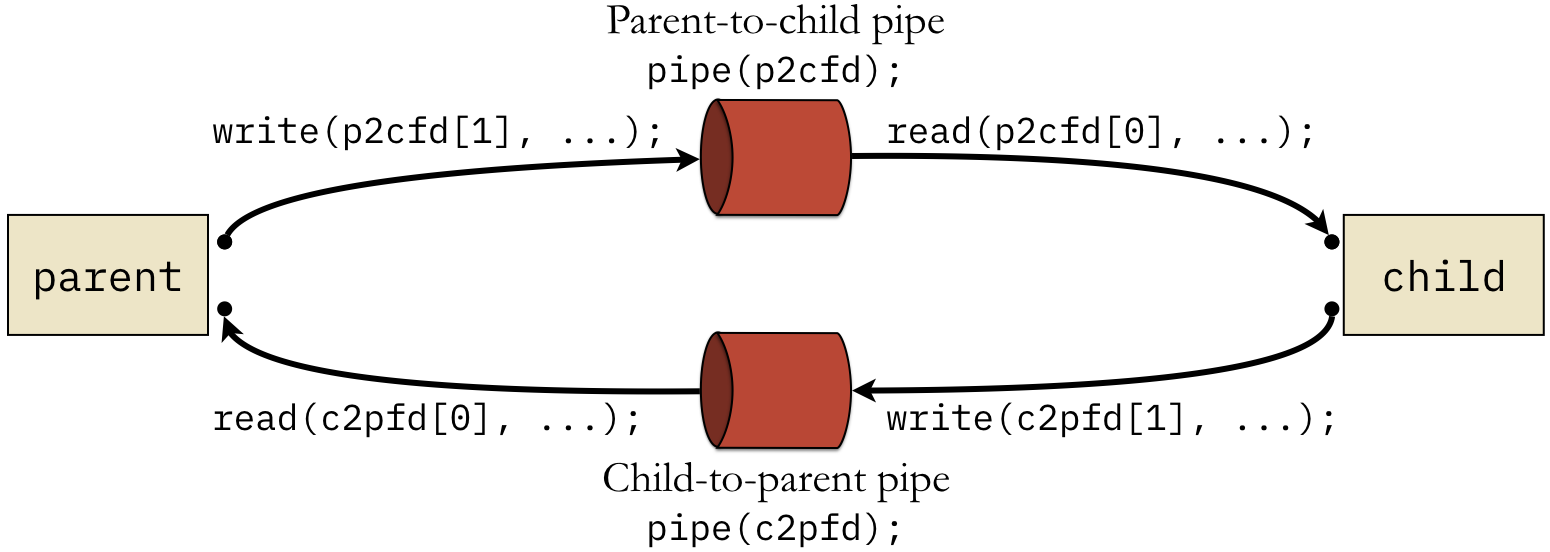
- Ordinary pipes are therefore unidirectional, if two-way communication is required, two pipes must be used, with each pipe sending data in a different direction.
- Require parent-child relationship between communicating processes
The dup() System Call
The dup system call is used to create a different file descriptor to an existing file object.
This
dup(fd1)will return a new file descriptor that will point to the same file object that fd1 is pointing to.The reference counter of the open file object that fd1 refers to is increased.
This will be useful to “save” the stdin, stdout, stderr, so the shell process can restore it after doing the redirection.
The dup() System Call
The dup2() function copies a file descriptor to another file descriptor
int dup2(fd1, fd2)
On success, the dup2() function returns the new file descriptor. If an error occurs, dup2() returns -1.
The dup2() function is defined in the header file unistd.h.
After calling dup2(fd1, fd2), fd2 will refer to the same open file object that fd1 refers to. The open file object that fd2 referred to before is closed. The reference counter of the open file object that fd1 refers to is increased.
Pipes cond..
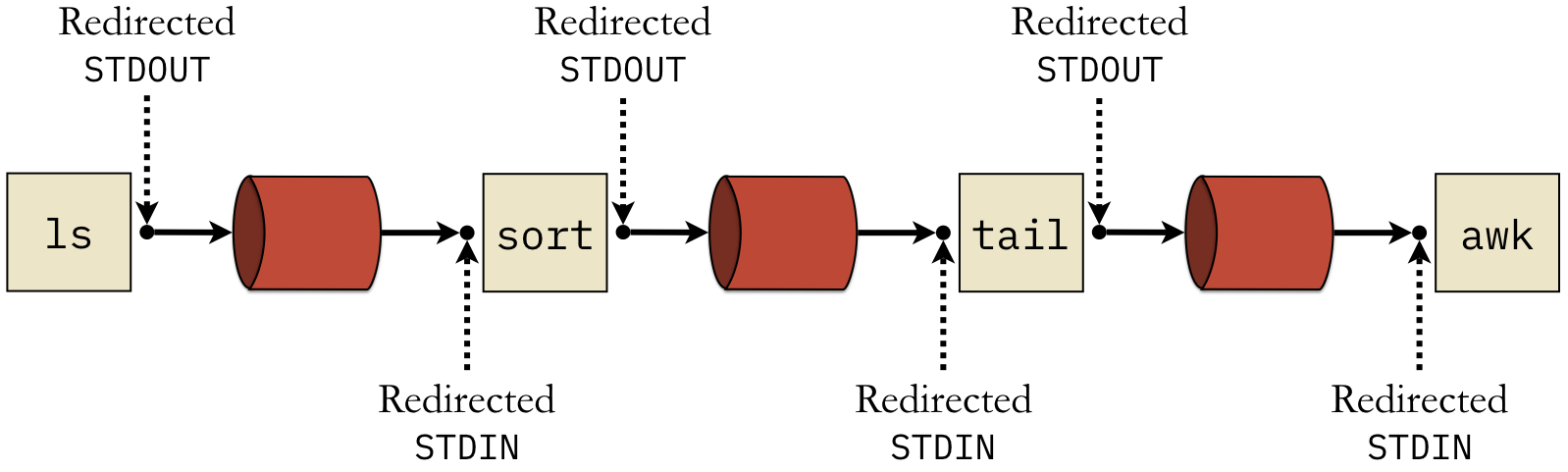
- This command line creates four processes that are linked together.
- First, the ls command prints out the list of files along with their details.
- This list is sent as input to sort , which sorts numerically based on the 5th field (the file size).
- The tail process then grabs the last line, which is the line for the largest file.
- Finally, awk will print the last field of that line, which is the file name of whatever file is the largest
Example
/*
   Using two pipes for bidirectional communication between parent and child
 */

int p2cfd[2]; /* parent-to-child */
int c2pfd[2]; /* child-to-parent */
char buffer[10];
ssize_t bytes_read = 0;

/* Clear the buffer and open the pipe */
memset (buffer, 0, sizeof (buffer));
if ((pipe (p2cfd) < 0) || (pipe (c2pfd) < 0))
  {
    printf ("ERROR: Failed to open pipe\n");
    exit (1);
  }

/* Create a child process */
pid_t child_pid = fork ();
assert (child_pid >= 0);

if (child_pid == 0)
  {
    /* Child closes write end of p2c, read of c2p */
    close (p2cfd[1]);
    close (c2pfd[0]);
    bytes_read = read (p2cfd[0], buffer, 10);
    if (bytes_read <= 0)
      exit (0);
    printf ("Child received: '%s'\n", buffer);

    /* Child sends response of "goodbye" */
    strncpy (buffer, "goodbye", sizeof (buffer));
    write (c2pfd[1], buffer, 10);
    exit (0);
  }

/* Parent closes read end of p2c, write of c2p */
close (p2cfd[0]);
close (c2pfd[1]);

/* Parent sends 'hello' and waits */
strncpy (buffer, "hello", sizeof (buffer));
printf ("Parent is sending '%s'\n", buffer);
write (p2cfd[1], buffer, sizeof (buffer));

/* Parent reads response back from child */
bytes_read = read (c2pfd[0], buffer, 10);
if (bytes_read <= 0)
  exit (1); /* should receive response */
printf ("Parent received: '%s'\n", buffer);
Named Pipes
- Named Pipes are more powerful than ordinary pipes
- Communication is bidirectional
- No parent-child relationship is necessary between the communicating processes
- Several processes can use the named pipe for communication
- Provided on both UNIX and Windows systems.
- Named pipes continue to exist even if the communicating processes have finished.
- Named pipes are referred to as FIFOs in UNIX systems.
- A FIFO is created with the mkfifo() system call and manipulated with the ordinary open(), read(), write(), and close() system calls.
Sockets
A socket is defined as an endpoint for communication
Concatenation of IP address and port – a number included at start of message packet to differentiate network services on a host
The socket 161.25.19.8:1625 refers to port 1625 on host 161.25.19.8
Communication consists between a pair of sockets
Remote procedure call (RPC) abstracts procedure calls between processes on networked systems Again uses ports for service differentiation.
References
- A. Silberschatz, P.B. Galvin, and G. Gagne. Operating System Concepts , 10th Edition; 2018; John Wiley and Sons.
- W. Stallings. Operating Systems: Internals and Design Principles. Prentice Hall, Upper Saddle River, NJ, Eigth edition, 2014.