Objectives
In this lab, you practice working with functions in Python.
Use:, Parameters:, and Returns:
Our function documentation contains Use:, Parameters:
and Returns:. Use: explains how to call a
function, Parameters: explains what must be true about
parameters in order for the function to work correctly, and Returns:
explains what a function does if its parameters are correct. All
function documentation must have Use: and Returns:,
but may not have Parameters: if the function does not
require parameters.
The Use: repeats the function definition (without the
keyword def, and shows the return values, if any, as part
of the function call.
Each Parameter comes in three parts:
- the name of the parameter
- a short description of the parameter
- the parameter's type and restrictions on its value (in parentheses)
Returns: describes the values the function returns.
Returns items have the same three parts that Parameters
have.
An example:
def calc_angles(side_a, side_b, side_c):
    """
    -------------------------------------------------------
    Calculates angles of a triangle given lengths of its sides.
    Use: angle_a, angle_b, angle_c = calc_angles(side_a, side_b, side_c)
    -------------------------------------------------------
    Parameters:
       side_a - length of the first side of a triangle (float > 0)
       side_b - length of the second side of a triangle (float > 0)
       side_c - length of the third side of a triangle (float > 0)
       side_c < side_a + side_b
    Returns:
       angle_a - angle (radians) opposite side_a (float)
       angle_b - angle (radians) opposite side_b (float)
       angle_c - angle (radians) opposite side_c (float)
    ------------------------------------------------------
    """
The Parameters: comment tells a programmer that the three
arguments passed to calc_angles must be floating point
numbers each with a value greater than 0. Values that do not fit these
requirements may cause the function to fail or return bad values. The Returns:
comment tells a programmer what the return variables contain if the
preconditions are met. The Use: comment shows how calc_angles
is called.
In CP104 we expect all functions to be defined with comments for each
parameter and return value. Functions that do not have parameters do not
have parameter comments. All functions have at least one line that
describes what the function does, even if the function returns only None,
in which the comment is:
    Returns:
        None
Libraries
A library is a set of functions and data that is organized under one name. The Python math library, for example, contains a number of standard mathematical functions such as cos, sin, and square root and constants such as pi and e. Some libraries, such as the math and random number libraries, come with the Python interpreter.
You must use the import statement to access a library. To
use the functions of the math library you must put the
statement:
from math import function or constant[, function or constant]
at the beginning of your code. This import statement gives your Python programs access to all of the listed functions and constants of the math library. To use a function from an imported library, you must name the function when importing the library. If you attempt to use a library function or constant without importing the library, the following error occurs:
value = cos(pi)
Traceback (most recent call last):
  File "<stdin>", line 1, in <module>
NameError: name 'cos' is not defined
In this example both the cos function and the pi
constant are imported from the math library:
# Imports
from math import cos, pi

value = cos(pi)
print(f"{value}")
-1.0
(Note: the cos function works with radians. The problem
will always state if the angles are given in degrees or radians. If
angles are given in degrees, the math library has a function to convert
from degrees to radians. The problem will also state if the result
should be given in degrees or radians. The math library also has a
function to convert from radians to degrees.)
The functions and constants available in the math library are documented at Python Library Reference - Mathematical functions
Custom Libraries
You create a custom library by simply defining your functions in a .py
module and importing that file into another file with the import
statement. For example, if your function file is named functions.py
and contains a function named calc, then you can import its
contents into another module with the code from functions import
calc. (This assumes that your main code and custom library both
exist in the same Eclipse project.)
Here is a simple example of a main program calling a function from a
separate file. The first file contains the print_tag
function stored in the functions.py module:
def print_tag(given_name, family_name):
    """
    -------------------------------------------------------
    Prints a name tag with user's given name and family name.
    Use: print_tag(given_name, family_name)
    -------------------------------------------------------
    Parameters:
        given_name - user's given name for tag (str)
        family_name - user's family name for tag (str)
    Returns:
        None
    ------------------------------------------------------
    """
    print()
    print("Hello, my name is")
    print(f"{given_name} {family_name}")
    print()
    return
The second file contains the main program and imports the function file
functions.py in order to call the function print_tag:
# Imports
from functions import print_tag

# Inputs
given = input("Please enter your given name: ")
family = input("Please enter your family name: ")
# Function calls
print_tag(given, family)
For assignments and labs you are required to create your own custom libraries. For example, this is what the final version of Assignment 4's project structure might look like when finished:
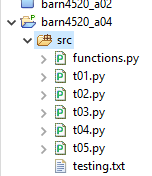
functions.py contains the functions called by t01.py
through t05.py.
Further Documentation
For CP104 we have documentation standards for your programs that we
expect you to follow. Eclipse can be set up to save you time by
automatically inserting this default documentation whenever you create a
new PyDev module. In Lab 1, you customized the cp104_main
documentation template that we had provided. We have created a different
template to be used for functions named cp104_functions.
Follow the instructions in Lab 1, to
customize the cp104_functions template with your name, ID
number and email address.
The Function Checklist
- When writing a function, make sure you've done the following:
- Given the function a valid name - the name must follow the same rules as valid variable names
- Made the function name unique - do not use a function name that matches another function or variable name
-
When calling a function, make sure the number
of arguments match the number of parameters in the function
definition:
def func(a, b, c): ... func(x, y, z) -
When calling a function, make sure the argument
types match the parameter types in the function definition - if the
parameter is an
int, the argument must be anint, etc. -
When calling a function, make sure to capture
any return values. The names do not have to match those in the
function documentation, but the number of capture variables must match
the number of returned values:
def func(a, b, c): ... return d, e u, v = func(x, y, z) - When defining a function, make sure the Use, Parameters, and Returns accurately reflect what they are describing
Instructions
When writing and submitting your tasks follow these requirements:
- Create a Python project named:
username_l04
and put your lab task material in this project. - Put your name, ID, and Laurier email address in the comments section of all modules.
- Test your tasks thoroughly with both the online testing and your own.
Copy the outputs from your testing to a file in your project named
testing.txt. Make sure the tests are well labelled so that we know which task the results represent. - Export your completed project to a archive file named:
username_l04.zip
Use only instructions given in Exporting Project of Lab 1 to create these .zip files.
We strongly suggest you save this zip file to your Downloads folder to make it easy to find. - Upload your completed project to the appropriate Dropbox in MyLearningSpace.
- Use the documentation style given in the Using Python Shell IDLE lab.
- Lab code must not have any errors, unused imports, or warnings. Grading fails when it runs into errors or bad imports.
- Use the Validate Assignment link to make sure that your project and .zip file are named correctly and have the proper contents. Improper lab submissions are given a grade of zero. If there are problems with an lab or assignment submission that would have been caught by the validator, but you did not use it, we will not remark the lab or assignment.
Marks are deducted from any tasks where these requirements are not met.
You may use any code or libraries provided as a solution to previous labs or assignments if your own code or libraries are incomplete or incorrect.
If you have problems creating, exporting, or renaming projects, follow the instructions in Using Python Shell IDLE tutorial.
Documentation Guidelines
- Syntax definitions are surrounded by a solid-line box
- Code is
numbered with a light background - Sample output is surrounded by a
dashed-line box
- Sample keyboard input is underlined, as in:
Enter a number: 34.5
Making a Custom Python Library
Create a Python module named functions.py. Each task
contains a copy of the function definition and documentation for the
functions you are to write. Copy the function definition and
documentation from the task into your functions.py module.
This module is a custom Python library. To test the functions, import
them into each task as appropriate. For example, t01.py
asks you to test the function diameter. To import and call
this function, write something like:
# Import
from functions import diameter
...
diam = diameter(r)
...
None of these function definitions require input and/or printing within the function. All inputs and prints must be done from the testing programs. Read the function descriptions, parameters, and returns carefully. The sample tests shown demonstrate what the final program looks like, and not necessarily what the functions do.
Hint: Some of these functions are repeats of work that you may have done in previous labs, but converted to function form. You are welcome to reuse any code you have from previous labs within your functions.
-
Implement the following function in the Python module
functions.pyand test it from a Python module namedt01.py:def diameter(radius): """ ------------------------------------------------------- Calculates and returns diameter of a circle. Use: diam = diameter(radius) ------------------------------------------------------- Parameters: radius - radius of a circle (float >= 0) Returns: diam - diameter of a circle (float) ------------------------------------------------------ """Sample execution:
diameter(2.5)5.0
Results
-
Implement the following function in the Python module
functions.pyand test it from a Python module namedt02.py:A Right Triangle def right_triangle(adjacent, opposite): """ ------------------------------------------------------- Calculates and returns the hypotenuse, circumference, and area of a right triangle given two non-hypotenuse sides. Use: hyp, circ, area = right_triangle(adjacent, opposite) ------------------------------------------------------- Parameters: adjacent - length of side right triangle (float > 0) opposite - length of side right triangle (float > 0) Returns: hyp - hypotenuse of the triangle (float) circ - circumference of the triangle (float) area - area of the triangle (float) ------------------------------------------------------ """Hypotenuse: \(\sqrt{adjacent^2 + opposite^2} \)
Sample execution:
right_triangle(3.0, 40)(5.0, 12.0, 6.0)
Results
-
Implement the following function in the Python module
functions.pyand test it from a Python module namedt03.py:def fraction_product(num1, den1, num2, den2): """ ------------------------------------------------------- Calculates and returns fraction values. Use: num, den, product = fraction_product(num1, den1, num2, den2) ------------------------------------------------------- Parameters: num1 - numerator of first fraction (int) den1 - denominator of first fraction (int != 0) num2 - numerator of second fraction (int) den2 - denominator of second fraction (int != 0) Returns: num - numerator of product (int) den - denominator of product (int) product - num / den (float) ------------------------------------------------------- """Sample execution:
fraction_product(1, 2, 4, 5)(4, 10, 0.40)
Results
-
Implement the following function in the Python module
functions.pyand test it from a Python module namedt04.py:def f_to_c(fahrenheit): """ ------------------------------------------------------- Converts temperatures in fahrenheit to celsius. Use: celsius = f_to_c(fahrenheit) ------------------------------------------------------- Parameters: fahrenheit - temperature in fahrenheit (int >= -459) Returns: celsius - equivalent to celsius (float) ------------------------------------------------------- """Sample execution:
f_to_c(32)0
Results
-
Implement the following function in the Python module
functions.pyand test it from a PyDev module namedt05.py:def time_values(seconds): """ ------------------------------------------------------- Returns seconds in different formats. Use: days, hours, minutes = time_values(seconds) ------------------------------------------------------- Parameters: seconds - total seconds (int >= 0) Returns: days - number of days in total_seconds (int >= 0) hours - number of hours in total_seconds (int >= 0) minutes - number of minutes in total_seconds (int >= 0) ------------------------------------------------------- """Use upper-case named constants for the appropriate time values.
Sample execution:
time_values(956000)(11, 265, 15933)
Results